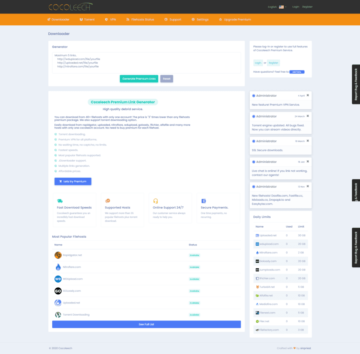
Description
We are looking at the Premium Link Generator CocoLeech Take a closer look. 🔎 The first traces of CocoLeech online date back to July 2015. Back then, everything was a little simpler, and only 5 File Hosts supported. 📂 However, a lot has happened since then, and today we'll take a look at the current status.
We purchased a premium membership for one month so that we can take advantage of all the benefits and thoroughly test Cocoleech in order to subsequently write a detailed review. This includes, among other things, that meanwhile supports over 40 file hosters be developed, that browser extensions like JDownloader can be used, that faster downloads are offered, and that even a VPN included is.
🆓 Test CocoLeech for Free – Then vs. Now
We still remember that CocoLeech used to be completely free could be used. ✅ Although it was Download traffic severely limited, but it was many popular file hosts supported, and smaller files could quickly downloaded become. ⏬
Sometime around End of 2020 However, the service was fully converted to a paid premium membership changed. 💳
Today presents itself CocoLeech, more professional than ever and offers its users numerous functions. With this offer, CocoLeech is a strong Alternative to other multi-hosters and doesn't have to hide from the competition. 🏆
Here's a quick overview of the benefits of a premium account:
- Torrent file support
- No waiting time and no captchas
- Fast download speed
- Support for the most popular file hosters
- JDownloader 2 Support
- Generating multiple premium links
- Affordable prices
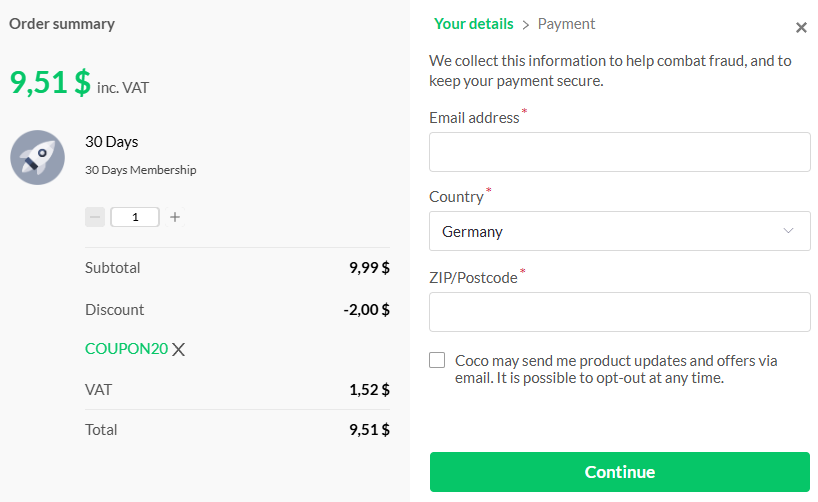
Cocoleech 20% Discount Coupon Code
There is currently a voucher code for Cocoleech. With the code „COUPON20“There’s a 20% discount on the Premium membership. We last tested the coupon on February 1, 2025, and it works without any issues.”.
Cocoleech Premium Link Test
To give us an impression of Cocoleech, we are testing the provider with the various file hosts. We have a 1000 Mbit DSL line available, and we use the Google Chrome browser with its integrated download manager or JDownloader 2 and disable the VPN. We naturally bought the premium account ourselves. We conducted the test on February 2, 2025.
| File hoster | Test of 02/20/2026 | Test 01/02/2025 | Test 2024 |
|---|---|---|---|
| Katfile.com | 17 MB per second | 29.2 MB per second | 22 MB per second |
| DDownload.com | 13 MB per second | 18 MB per second | 14 MB per second |
| Keep2Share | 9.5 MB per second | 18 MB per second | 5.5 MB per second |
| Turbobit.net | 11 MB per second | 2.3 MB per second | 10 MB per second |
| Hitfile.net | 11 MB per second | 3 MB per second | 21 MB per second |
| Mediafire.com | 3.5 MB per second | 9 MB per second | 3.4 MB per second |
| Filer.net | Generation failed | 7.5 MB per second | 4.9 MB per second |
| Filejoker.net | 4.2 MB per second | 3.5 MB per second | 3.3 MB per second |
| Alfafile.net | 11.5 MB per second | 53 MB per second | 21 MB per second |
| Emload.com | 55 MB per second | 45 MB per second | 26.4 MB per second |

Here is the statistics of download speeds for various file hosters:
- Increased speed:
- Alfafile.net53 MB/s (2025) vs. 21 MB/s (2024) 🚀
- Emload.com45 MB/s (2025) vs. 26.4 MB/s (2024)
- Keep2Share18 MB/s (2025) vs. 5.5 MB/s (2024) 📈
- Katfile.com29.2 MB/s (2025) vs. 22 MB/s (2024)
- Turbobit.net11 MB/s (2026) vs. 10 MB/s (2024)
- Sunk speed:
- Hitfile.net11 MB/s (2026) vs. 21 MB/s (2024)
The bar chart shows a direct comparison between 2024 and 2025.
1Fichier: Online
Next, we'll test the French file hoster 1Fichier.com with Cocoleech. The daily download traffic limit is 20 GB per day. The file downloads in a few seconds.
- The download starts immediately
- Speed is about 23 MB per second

DDownload.com: very good
Let's now turn our attention to Download.com formerly DDL.to. The download is available immediately and also starts promptly. The download speed is approximately 18 MB per second. The daily download traffic at Cocoleech is 15 GB.

Filefactory.com: Failed
With the file hoster Filefactory.com Unfortunately, with the Cocoleech Chrome browser, we only get the message "Failed." The download is unavailable and not accessible. We will try again at a later time. There is no improvement with JDownloader either. We only have the option to download in free mode.
Filer.net: JDownloader is running - Browser is not running
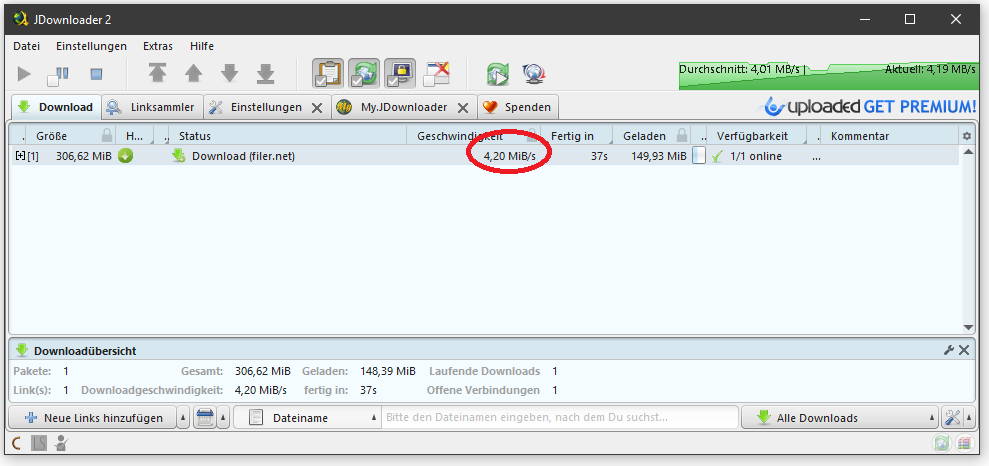
Even with the file hoster Filer.net This time we won't have any browser issues and we can start the download. The download also works with JDownloader 2. The download starts immediately and the speed is around 2,500 KB per second.
Keep2Share K2S: Download starts immediately
There is good news for everyone Keep2Share User. Cocoleech immediately provides the file from Keep2Share for download without any problems. The download also starts right away, and the speed fully utilizes our internet connection. We can download the file at almost 24 MB per second and barely have time to take a screenshot. Unfortunately, Cocoleech's download traffic is limited to 2 GB per day.


Alfafile.net: JDownloader works
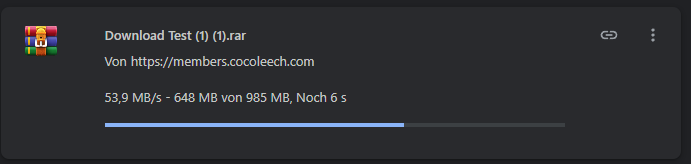
Also the file hoster Alfafile This can be achieved with Cocoleech when using the Chrome browser. Downloading with JDownloader also works without problems, and we can download from Alfafile at up to 53.9 MB per second.
Daofile.com: runs very well
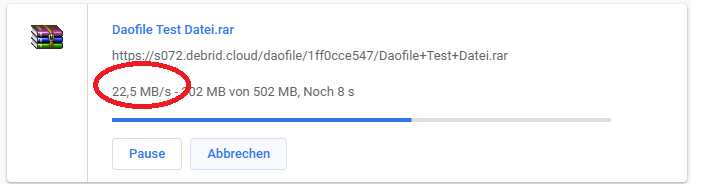
We have no problems whatsoever with the file hoster Daofile.com and can easily create the link in the browser with the downloader generator from Cocoleech. The file is immediately available for download, and we can download it at almost full speed, just under 23 MB per second.
Turbobit: Online – works only with JDownloader
We tried to download a file hosted on Turbobit through Cocoleech in the browser, but the download link was not generated. Instead, we received the error message „Generation failed: Unsupported host for this URL.“.
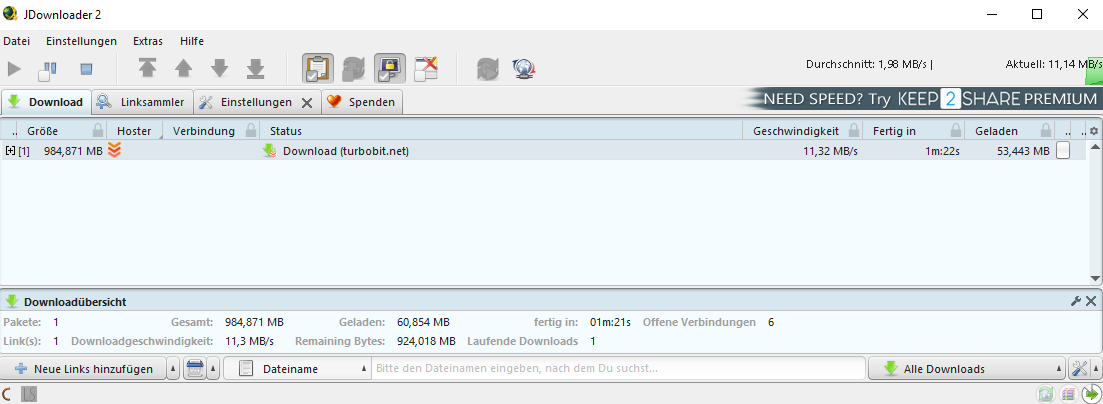
We then pasted the same Turbobit link into JDownloader and downloaded directly from there. This worked immediately, and the download ran stably and constantly at about 11 MB per second.
Hitfile: Online - only works with JDownloader
At Hitfile, we tested it the same way afterward. We first tried to download the file hosted there via Cocoleech in the browser, but the download link was not generated again, and the same error message appeared as before with Turbobit: „Generation failed Unsupported host for this URL.“. Afterward, we pasted the Hitfile link into JDownloader, and it worked immediately. The download ran stably and consistently at just under 11 MB per second.

Emload (WDupload): Online
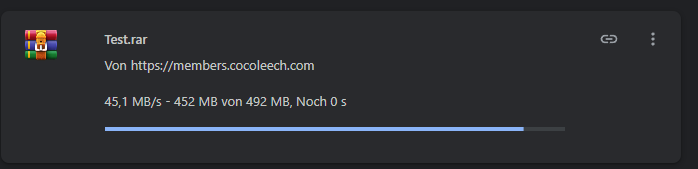
We were also able to reach the file hoster Emload (formerly WDupload) very well. The downloader from Cocoleech generated the link for us in a few seconds and we could download the file. We reached up to 45 MB per second, with the speed constantly increasing. We barely had enough time to take a screenshot.
Set up JDownloader 2 Account
Since we had some problems downloading from some file hosters with the Google Chrome browser, we are setting up our Cocoleech premium account in JDownloader 2.
- Download JDownloader for free
- Under Settings, add account
- Select Cocoleech
- Enter username and password
- Download files
Support
Our experiences with Cocoleech support in 2025 were rather mixed. At that time, we contacted support multiple times with problems and sometimes waited a very long time for a response, or received no feedback at all. Our expectations were accordingly low.
In 2026, Cocoleech support had significantly improved. Feedback was received faster, and concrete solutions were offered, which overall left a much more professional impression.
Cocoleech Host List
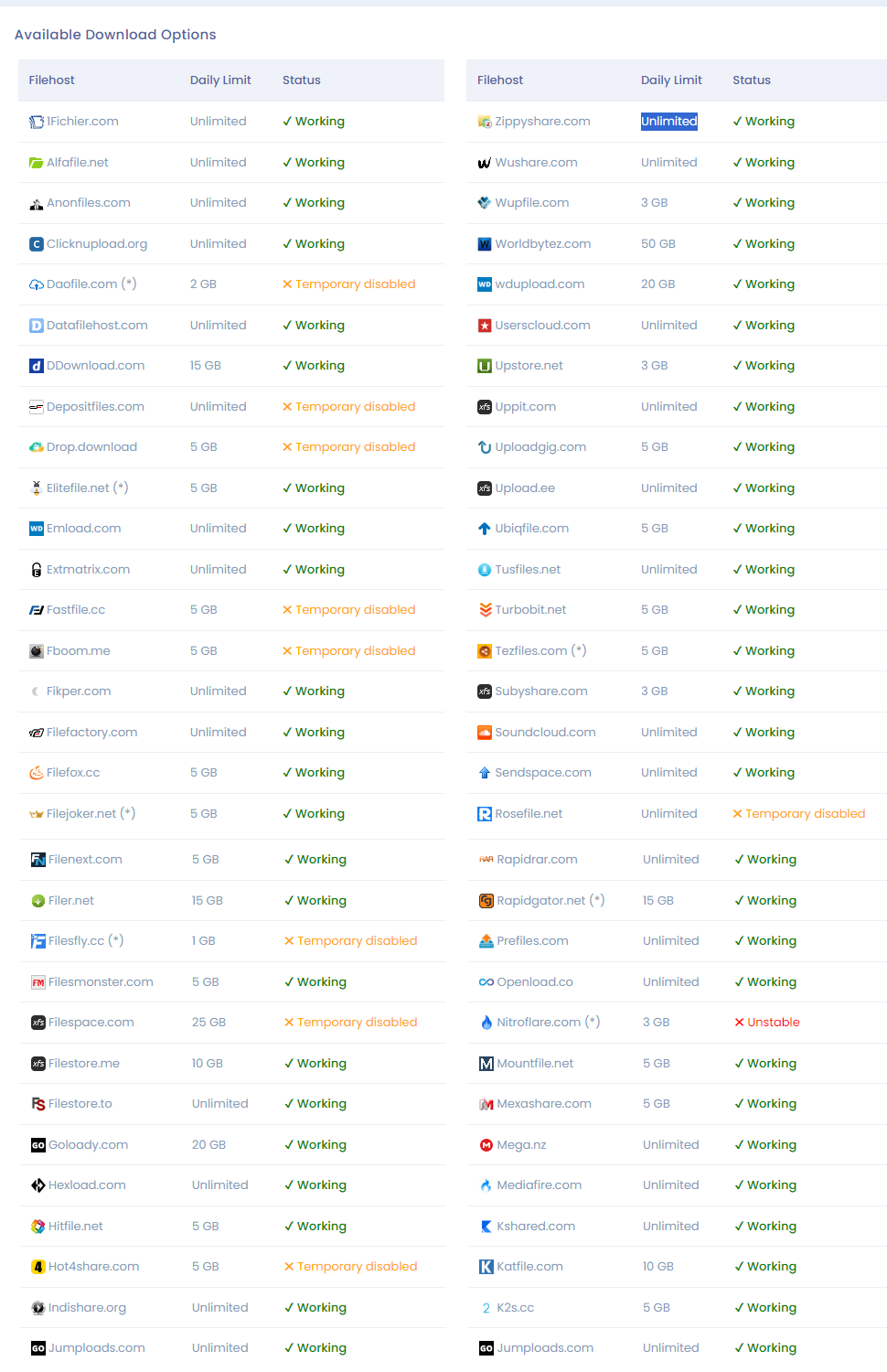
Here is the statistics of tested file hosters:
- ✔ Working: 62 hosts work perfectly. ✅
- ✖ Temporarily disabled: 9 hosts are temporarily disabled. ⛔
- ✖ Unstable: 1 Host is unstable. ⚠️
The bar chart visually shows the distribution.
 Conclusion: Very good
We were positively surprised by Cocoleech. The multihoster keeps almost all its promises, and we were able to download from all file hosters at very high speeds. The biggest problem was that we couldn't reach FileFactory and had to use JDownloader twice for help. Furthermore, we would have liked more daily download traffic from Keep2Share and general support for the file hoster Rapidgator.
Support responded to our ticket within a few hours in a friendly manner, and numerous new features have been added in recent weeks (VPN service, video streaming, SSL downloads). We’ve also noticed the affordable price. The one-year account, in particular, is very affordable at 55,99$ compared to other providers. There’s even a special offer right now, and a one-year Cocoleech Premium account costs just 40,99$.
We really like Cocoleech and can recommend the multi-hoster.
FAQ about Cocoleech, Multihosters, and Filehosters
What is Cocoleech?
Cocoleech is an online service that allows users to download files from various file hosting services without having to log into each individual service. It is a multihoster that provides access to different file hosting platforms through a single user interface.
2. How does Cocoleech work?
Cocoleech acts as an intermediary between users and various file hosting services. Users simply enter the link to the file they wish to download, and Cocoleech downloads the file from supported file hosters and makes it available for the user to download.
3. Which file hosting services are supported by Cocoleech?
The supported file hosting services may vary, but they typically include well-known platforms like Uploaded, Rapidgator, Turbobit, Nitroflare, and many others.
4. What is a multi-hoster?
A multihoster is a service that allows users to download files from various file hosting services without needing separate accounts for each service. By using a multihoster, users can access multiple file hosting services from a single platform.
5. Why do people use Cocoleech and other multihosters?
The use of Cocoleech and other multihosters offers several advantages, including:
- Convenience: Users don't need to sign up for multiple file hosting services and manage different accounts.
- Cost savings: A multi-hoster can often be cheaper than separate subscriptions for multiple file hosting services.
- Increased Download Speed: Some multi-hosters offer the ability to download files from multiple hosts simultaneously, which can increase download speed.
6. Are there any restrictions on using Cocoleech?
The restrictions may vary depending on Cocoleech's terms of use, but typically there are limitations on file size, the number of simultaneous downloads, and the maximum download speed for non-paying users.
7. Is the use of Cocoleech legal?
The legality of using Cocoleech depends on how the service is utilized. Downloading copyrighted content without the permission of the rights holder can be illegal. Users should ensure that they only download files for which they possess the necessary rights or that are free from copyright restrictions.
8. What are the alternatives to Cocoleech?
There are various alternatives to Cocoleech, including other multihosters such as Linksnappy, Premiumize, AllDebrid, and Real-Debrid. Some users also prefer direct subscriptions to specific file hosting services, depending on their individual needs and preferences.
9. Is the use of multihosters safe?
The security of using multi-hosters depends on the trustworthiness of the service. Users should be careful to choose a reputable and established provider to minimize the risk of security issues. Additionally, users should store sensitive information such as passwords securely and protect themselves from phishing attempts.
Does Cocoleech offer a free service?
Cocoleech typically offers both free and paid services. However, the free service often has limitations in terms of features and usage, while paid subscriptions may offer additional benefits and features, such as higher download speeds and fewer restrictions.
Related Products







User Reviews
Comments
Unique 16. May 2026 um 17:13
This product works really well. It sympathetically improves my baseball play a lot.
Zita 16. May 2026 um 22:07
It only works when I'm in Niue.