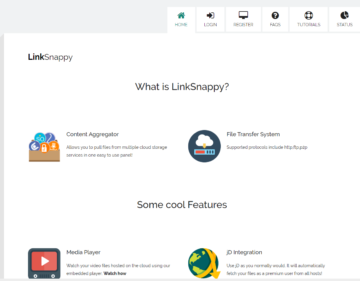
Description
Linksnappy.com is a multihoster service, which allows you to download files from various file hosts via a single Premium Account to download. The advantage: You don't need a separate account for every one-click hoster, but with a Linksnappy account, you have access to multiple hosters simultaneously. This saves you money, a lot of time, and frustration.
The Signing up for LinkSnappy is free, so you can test the service without obligation. Many users report positive experiences, especially in terms of ease of use, fast downloads, and good accessibility. If you like the service, you can choose from a variety of affordable premium memberships. LinkSnappy guarantees smooth payment processing and secure data transmission. In addition, there are numerous payment options available to you. The 7-day Premium account is available for just 4.99$.
Linksnappy Test of January 2026
We tested the multihoster Linksnappy again this year. For the Download Test do we have the JDownloader 2 used, the Linksnappy Premium Account and a 1,000 Mbit internet connection. The maximum download speed of the line is approximately 125 MB per second. We were able to reach most file hosts without any problems. Unfortunately, we received an error message from the file hosts Rapidgator, Emload, and Hitfile.
| File hoster | Linksnappy Test 01.14.2025 (1000 Mbit) | Test 7.23.2024 (500 Mbit) | Test 1.1.2024 | Test from 05/21/2022 |
|---|---|---|---|---|
| Keep2Share.com | 40 MB per second | 28 MB per second | 32 MB per second | The download links you provided are invalid. |
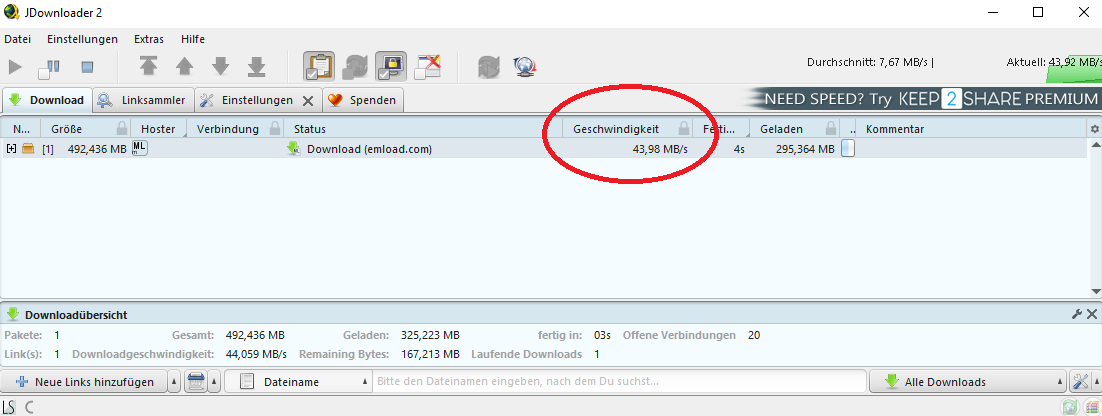
| DDownload.com | 44 MB per second | 26 MB per second | 28 MB per second | 24 MB per second |
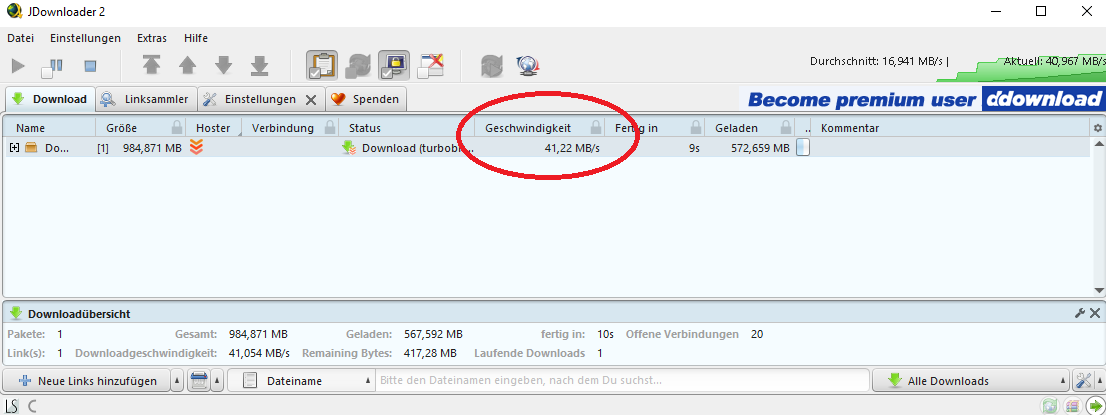
| Turbobit.net | 41 MB per second | 26 MB per second | 25 MB per second | 24 MB per second |
| KatFile.online | 40 MB per second | 30 MB per second | 32 MB per second | 24 MB per second |
| 1fichier.com | 45 MB per second | 25 MB per second | 5 MB per second | 25 MB per second |
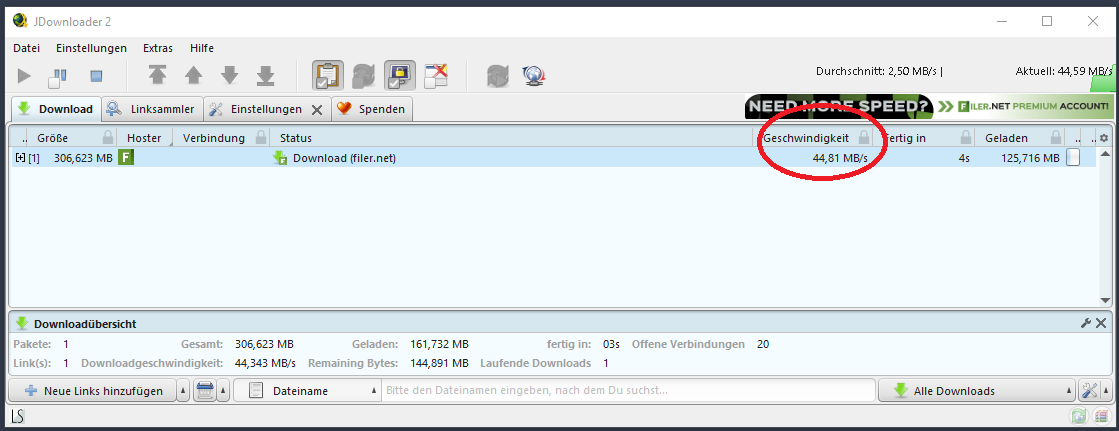
| Filer.net | 40 MB per second | 24 MB per second | 32 MB per second | 6 MB per second |
| MEGA.nz | ||||
| Filefactory.com | 11 MB per second | 25 MB per second | 18 MB per second | 25 MB per second |
| Emload.com | 44 MB per second | Blocked by Cloudflare Site-Protection | 30 MB per second | 24 MB per second |
| Rapidgator | Temporarily unavailable | Download not starting (Captcha required) | 99 KB per second | Could not start download in system |
| Hitfile.net | 38 MB per second | - | - | - |
| File.al | 2.7 MB per second | 1.8 MB per second | 25 MB per second | 24 MB per second |
How Linksnappy works
The way Linksnappy works is amazingly simple and user-friendly:
- Registration and SubscriptionFirst, you create an account on Linksnappy and choose a suitable subscription. There are various pricing models depending on the desired usage period and data volume.
- Inserting the linksThe user pastes the links of the files they want to download into the Linksnappy interface. Linksnappy automatically detects which host is being used and generates a download link.
- DownloadWith this generated link, the file can be downloaded directly – quickly and without the usual restrictions that free hosts often impose, such as slow speeds and waiting times.
Turbobit.net Status: Online
 We were able to easily access the hoster Turbobit on 01/05/2026 via Linksnappy and JDownloader and download the test file without any difficulty. We achieved a Download speeds of up to 43 MB per second. For users who want to download large amounts of data from Turbobit, purchasing a Linksnappy Premium account is recommended. We have consistently had good experiences with Linksnappy and Turbobit.
Rapidgator.net Status: Error message
 Currently, we cannot retrieve files from Rapidgator download with our Linksnappy account. We tried on January 5th and 6th, 2026, and only encountered problems. So, anyone who wants to download files from the file hoster at full speed should look for an alternative multihoster or buy a premium account directly with Rapidgator.
Keep2Share.cc Status: Accessible again
 Keep2Share is becoming increasingly popular and is one of the most expensive hosts on the market. A multihoster with Keep2Share support would be ideal, and we were also able to reach K2S with our Linksnappy Premium Account. The download speed was approx. 43 MB per second, and for our 1,000 MB test file, we only needed a few seconds to download it. It's best to get yourself a Keep2Share Premium Account, if you want to download larger amounts of data.

DDownload.com: online
The Filehost DDownload.com is becoming increasingly popular and has recently been added to Linksnappy's list of supported hosts. The host is still in the testing phase, and 100%iger support is not guaranteed. If we take a look at the Linksnappy host list, we find DDownload.com, and its status is Uunlimited. We were able to reach the file hoster without any problems and had a maximum Download speed of approximately 42 MB per second. Which is a relatively good test result, in our experience.

Filer.net Test Status: online
After a few initial difficulties, I was able to get my file from the file hoster Filer.net Download with Linksnappy. The speed was constantly high at just over 40 MB per second, nearly maxing out my internet connection.
Update 2026: It took a few seconds again for the Filer.net download to start, but after that, we could with over 40 megabytes per second download from the file hoster.
Emload.com Status: offline again
This time, we were unable to access the files from the file hoster Emload (01/05/2026). As usual, we tried JDownloader2 and a regular LinksNappy Premium account.
Setting up Linksnappy with JDownloader
With this multi-hoster service, you can manage all your downloads through a single account. Combined with JDownloader, a handy download manager, everything becomes even easier. In this article, we'll show you how to set up Linksnappy quickly and easily with JDownloader.
What you need
- JDownloader: A free download manager that organizes and accelerates downloads from various sources.
- Linksnappy Account: A multi-hoster service that allows you to access multiple file hosters with just one account.
Step-by-step instructions
- Download and install JDownloader:
- Go to JDownloader Website and download the latest version. Follow the installation instructions.
- Create a Linksnappy Account
- If you don't have an account yet, sign up at Linksnappy.com and create one.
- Open JDownloader and add Linksnappy:
- Start JDownloader and go to „Settings“.
- Select „Account Manager“ and click „Add Account“.
- Add Linksnappy as a premium hoster:
- Select „Linksnappy“ from the list of supported hosts.
- Enter your Linksnappy login details (username and password) and confirm.
- Review and Test:
- Ensure your Linksnappy account is active. JDownloader should display a confirmation to you.
- Start downloads:
- Add links to files in JDownloader. The download manager will automatically handle them through your Linksnappy account.
Linksnappy Premium Account Cost
The Premium Account at Linksnappy costs about as much as a premium subscription to a single file hoster. So you can save a lot of money with Linksnappy and be independent of individual hosters. The team is constantly working to ensure that everything smoothly runs and problems are fixed as quickly as possible. Linksnappy is so convinced of its service that it offers a 7-day money-back guarantee promises. Prices have been stable for 4 years and have not been increased.
Pay with Paysafecard
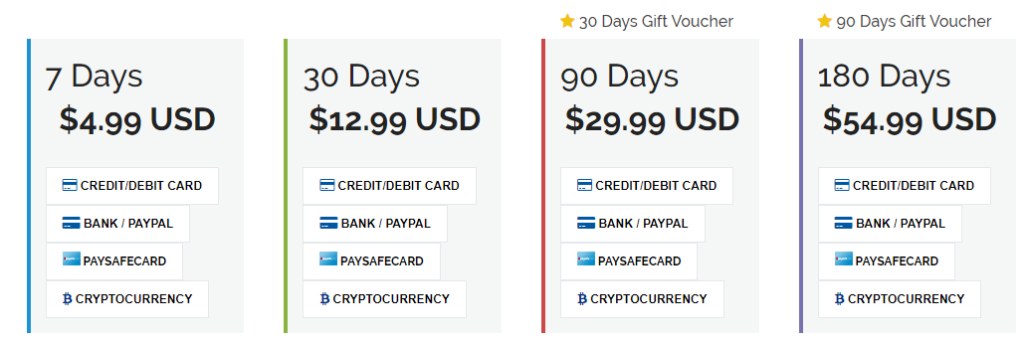
Whoever their Linksnappy Premium Account with the Pay with Paysafecard for whom there are special offers.

Torrent data
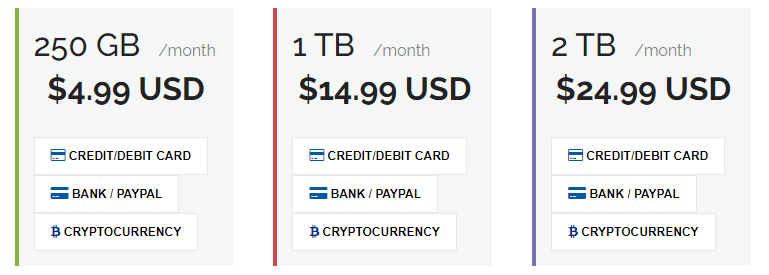
There's another offer. You can, namely, with Linksnappy Torrent Packages Buy. Those who limit their downloads to torrent files can choose from three plans.
- 250 GB per month for 4.99$
- 1 TB per month for 14.99 $
- 2 TB per month for 24.99$
Payment Options
LinkSnappy allows for secure payment through services such as PayPal. Also, an anonymous payment method like, for example, the Paysafecard is listed as a payment method. In general, LinkSnappy offers various ways to pay for a subscription or premium access.
- Payment by Credit card (Visa, Mastercard)
- Payment by PayPal
- Payment by Paysafecard (PSC)
- Payment with 75+ cryptocurrencies (Bitcoin, Litecoin, Dash, Dogecoin, and many more)
- Payment by Instant Bank Transfer
- Payment by Transfer
- Payment by GiroPay
What are the benefits of LinkSnappy?
LinkSnappy has various bonus offers available, allowing users easy access to the multi-hoster. Different subscription options and various payment methods are available. With one Premium Account The various services of the multi-hoster as well as other file hosters can be used. The multi-hoster is also described as user-friendly. Below, we will go into more detail for you about the individual advantages as well as other aspects, such as data protection.
- JDownloader 2 Support
- Browser Plugins for Chrome and Firefox
- Linksnappy Load
- Download in premium mode
- 30 + File hosts
- Torrent Files
- Usenet Connection
Additional benefits of Linksnappy
Cost savingsInstead of having to pay for multiple premium accounts with different hosts, a single Linksnappy subscription is sufficient. This makes the service particularly attractive for frequent downloaders.
2. Diverse SupportLinksnappy supports a wide range of hosters, including well-known names like Rapidgator, Uploaded, Nitroflare, and many more. The list of supported hosters is constantly being expanded and updated.
3. Speed and ReliabilityWith a Linksnappy account, users can experience the full download speeds available from premium hosts without the typical wait times or speed limitations of free accounts.
4. Easy to useLinksnappy's user interface is intuitive and easy to use, so even less tech-savvy users can navigate it without problems.
5. Safety and Data ProtectionLinksnappy places great importance on the security and privacy of its users. All downloads are encrypted and user data is treated confidentially.
Disadvantages and limitations
Of course, there are also some disadvantages and limitations to consider when using Linksnappy:
1. Availability of hostsAlthough Linksnappy supports many hosts, not all are always available. Sometimes, certain hosts may be temporarily inaccessible due to technical issues or changes in their terms of service.
2. Subscription costsWhile Linksnappy is cost-effective compared to multiple individual subscriptions, the price may still seem high for some users, especially if they only download files occasionally.
3. Third-party DependencyUsing a multi-hoster means you are reliant on a third-party provider for reliability and service. If Linksnappy ceases operations or experiences technical issues for any reason, users could temporarily lose access to their files.
LinkSnappy – Use more than 30 file hosters
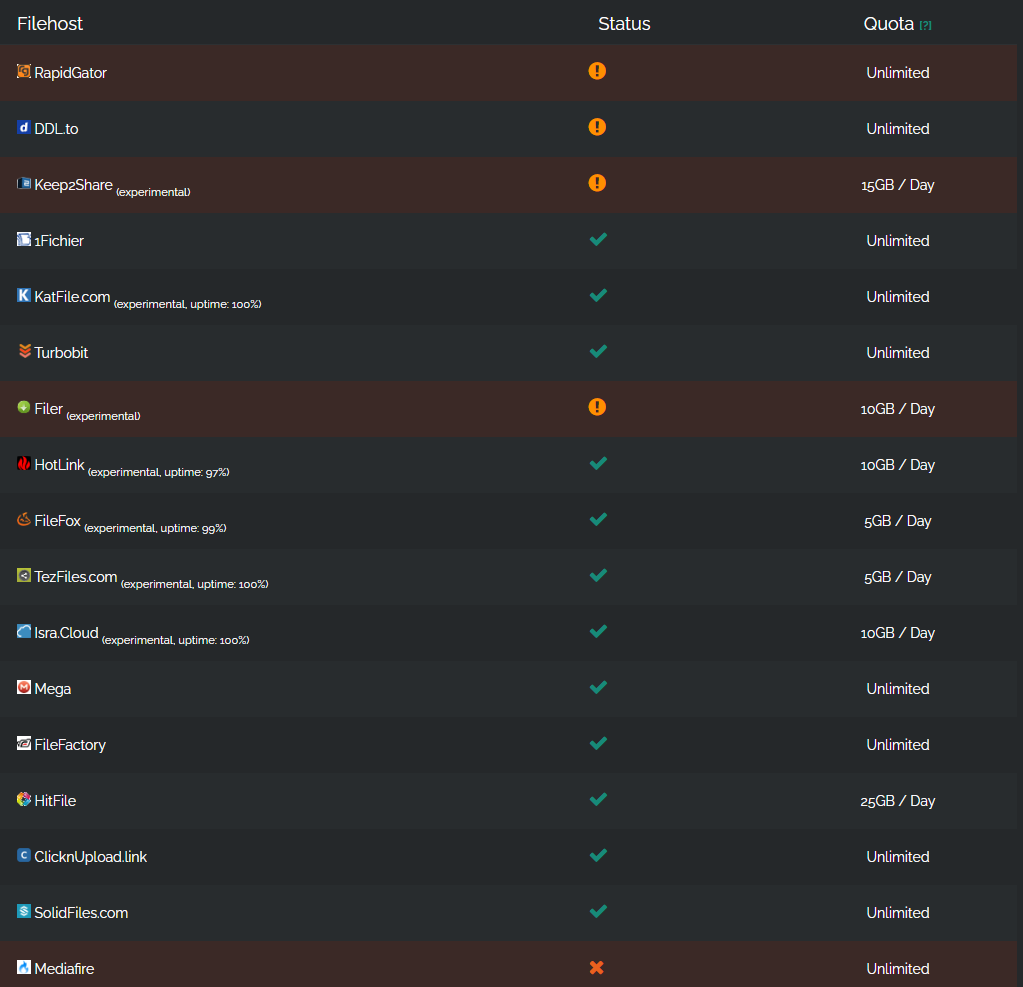
 LinkSnappy offers over 30 different file hosters, that a customer can use. On the website you will find the exact status of the hosts (Online, Offline, Experimental). First, you can free account set up and this, quasi in a Test phase use. During the trial period, you have the option to purchase a premium account or use such an account via subscription.
To use a premium account, you must register via email or log in to LinkSnappy through social media such as Facebook, Google, or Twitter. If you the free account First, if you want to use it, keep in mind that some functions will have limited usability and your data volume will also be limited.
The premium account can be with various runtimes can be booked. You have the choice to unlock or purchase a Premium Account for 180 days, 90 days, 30 days, or even just 7 days. A total of four Premium Account packages are available to you.
Linksnappy Host List and Status
Here is the current Linksnappy hoster list and service status (as of January 5, 2026):
Earn money with LinkSnappy (Affiliate Program)
 LinkSnappy offers you an interesting affiliate program. You have the opportunity to take advantage of certain bonus offers. For example, you can use the premium account of Recommend LinkSnappy and through the recommendation also receive membership days as bonuses or even Make money with Linksnappy.
The bonus is subject to certain conditions. Specifically, a new user must be directed to Multihoster via the so-called referral link. The membership must be created through this referral link. So you can share your link from the affiliate program with your friends and earn a 30% commission on their first purchase, as well as 30% on every renewal of their Premium account. Payments are conveniently made via PayPal, Bitcoin, Litecoin, or WebMoney.
Voucher or discount
According to LinkSnappy, the new user can also benefit from a Discount benefit. If a Premium Account is established, the new user can receive a 5 percent discount on their first order. If you sign up for a Premium Account, you can also get a Voucher for Linksnappy received. The vouchers are available for 180 days or 90 days upon activation. The voucher is intended for advertising in the local area and can be given to friends, for example.
What payment methods, besides PayPal, are possible?
Premium Account on LinkSnappy by debit card, credit card, Paysafecard and be paid via PayPal. Furthermore, various [options] are also available Cryptocurrencies are available as payment methods. You can find detailed information about the various payment options on LinkSnappy itself. Changes can occur from time to time.
What are the potential premium account costs?
 If you the Multihoster LinkSnappy use, then you can Premium Account unlock for 180 days. This costs $54.99 for 180 days. If you only want to use the account for 90 days, you pay $29.99. For 30 days, it's $12.99, and 7 days must be paid for with $4.99. We cannot guarantee completeness or accuracy for the stated costs. It is advisable to carefully read the terms and conditions, as well as the costs and payment terms on LinkSnappy.com.
Data Protection – How secure is LinkSnappy?
 LinkSnappy provides, according to the service provider, comprehensive data security. The data collected by you will also only be used for specific necessary processes. For example, personal data must be collected for payment processing and registration. Contact cannot be made without personal data either.
You must also expect that your IP address and further data is stored by LinkSnappy through directories, downloads, or other functions. Like many other services, so-called demographic data is collected. The data is intended to further develop the services and make them more user-friendly. LinkSnappy also states that it may share demographic information with advertising partners. LinkSnappy also uses cookies.
Linksnappy offers its users the option „My download logs are not saving„, with this option, the download protocol can be disabled. Linksnappy fundamentally tries to store as little information as possible.
Users have the option to disable download logs in their account area. Additionally, the multi-hoster does not retain any payment information. The information is processed by payment processors, which represent a secure platform for encrypting and protecting data.
Customer service and support areas
 LinkSnappy naturally offers customer service that you can use by logging into your account. Immediately after logging in, you need to look for the „My Account“ option. Within the „My Account“ submenu, various other menus can be found. There you will go to the Support Center. You can report directly to the support center or before logging in, there's a Ticket create questions or problem statements.
In the Support Center, you can also check your ticket status. Just like with many online providers, LinkSnappy also offers you Frequently Asked Questions available. Your problems and questions may be answered there. If you prefer direct communication, you have the option to Live Chat.
We reached support via live chat on 07/20/2024, and received an answer to our questions directly within a few minutes.
Topics: Operation and User-Friendliness
LinkSnappy, according to online test reports, has a clear navigation. The structure allows users to read the most important information about LinkSnappy directly on the homepage. You can also register for LinkSnappy directly on the homepage. You will also find the option there to free registration. Testimonials from users are also featured on the homepage itself.
It is advisable to read various reviews of LinkSnappy before using it, and especially before creating a premium account, to see if the service might be right for you. Furthermore, an initial free registration and a thorough test are recommended.
LinkSnappy also offers on the website LinkSnappy.com Tutorials It explains the intended use of the multihoster. Furthermore, information on account data and filehosters is also provided. LinkSnappy allows users to manage and download files. On the account pages, after logging in, support and upgrade options (premium upgrade) are also available. When using multihosters, ensure that only legal use is made.
FAQ (frequently asked questions)
Here we answer the most frequently asked questions about the multi-hoster Linksnappy. If you still have a question, just write a comment and we will answer you as soon as possible.
Can you download torrent files with Linksnappy?
Yes, you can also download torrent files with Linksappy.
Is Usenet supported?
No, Usenet is not yet supported.
Is JDownloader 2 supported?
Yes, there is a browser plugin for both Chrome and Firefox browsers. You can download it for free directly from the website.
Are there any vouchers or coupons for Linksnappy?
Yes, after you purchase a Premium Account, you'll receive a 10% discount on your next order using the Coupon Code 10% OFF.
Can I pay for the premium account with PayPal?
Yes, Linksnappy has resellers that accept PayPal.
Where can I redeem a gift voucher?
Simply scroll down to the Elite Membership menu item. Vouchers or gift vouchers can only be used on a free Linksnappy account be redeemed.
General Questions about Linksnappy
What is Linksnappy?
Linksnappy is a multihoster service that allows users to download files from various file hosts with a single premium account. It simplifies access to a wide range of hosts and offers a fast and smooth download experience.
How does Linksnappy work?
Users register with Linksnappy, select a subscription, paste the links of desired files into the Linksnappy interface, and receive generated download links that they can use for direct downloading.
Which hosts are supported by Linksnappy?
Linksnappy supports a wide range of hosters, including Rapidgator, Uploaded, Nitroflare, and many more. The list of supported hosters is regularly updated.
Registration and Subscription
4. How do I register with Linksnappy?
Visit the Linksnappy website and click „Register.“ Enter the required information and confirm your email address to activate your account.
What subscription options are there?
Linksnappy offers various subscription options that differ in duration and the amount of downloadable data. For details on current plans, please visit the Linksnappy website.
6. Can I test Linksnappy for free?
Yes, Linksnappy offers a free trial access that allows new users to try the service before purchasing a subscription.
Usage and functions
7. How do I add a download link?
Copy the desired download link and paste it into the corresponding field in the Linksnappy interface. Linksnappy will then generate a direct download link for you.
8. Can I download multiple links at once?
Yes, Linksnappy allows you to download multiple files simultaneously, depending on your subscription plan's limitations.
9. Are there download speed limits?
With a premium account, there are no speed limitations. You can use the maximum available download speeds.
Security and Data Privacy
10. Are my downloads at Linksnappy safe?
Yes, all downloads via Linksnappy are encrypted to ensure the security and protection of your data.
11. How does Linksnappy handle my personal data?
Linksnappy treats all user data confidentially and does not share any information with third parties. For more details, please refer to the privacy policy on the Linksnappy website.
Technical Problems and Support
12. What should I do if a host is not working?
If a host is temporarily unavailable, you can report this to Linksnappy support. The team is continuously working to ensure the availability and reliability of the supported hosts.
13. How do I reach customer support?
Linksnappy's customer support is available through their website. You can either create a support ticket or use the live chat for quick assistance.
14. What can I do if my account has been blocked?
If your account is suspended, please contact customer support immediately to clarify the reason and find a solution.
Payment issues
15. What payment methods are accepted?
Linksnappy accepts various payment methods, including credit cards, PayPal, and cryptocurrencies. For a complete list of accepted payment methods, please visit the Linksnappy website.
16. Is there a money-back guarantee?
Yes, Linksnappy offers a money-back guarantee within a specific period after purchase if you are not satisfied with the service. For more details, please refer to the terms and conditions.
Other questions
17. Can I use Linksnappy on mobile devices?
Yes, Linksnappy is optimized for use on mobile devices, so you can easily download files on the go.
18. Is there a way to recommend Linksnappy and receive benefits?
Yes, Linksnappy offers a referral program where you can earn rewards for referring new users. You can find more information about it in your Linksnappy account under the „Referrals“ section.“
Linksnappy Test Changelog:
- 01.05.2026: We tested all filehosters and the results were mixed. We were able to reach Keep2Share well again, but unfortunately not Hitfile and Filer anymore.
- 01.15.2024: We re-ran the test with various file hosters. We reached almost all hosters and were able to download at almost maximum speed.
- 09.17.2024: The article has been revised and the JDownloader tutorial has been supplemented.
- 23.07.2024: The hoster list has been updated and brought up to date. Only about 30 file hosters are now supported.
- Test Update 07.20.2024: We tested Linksnappy again. The experiences and test results for the file hosters Uploaded.to, Oboom, and Uptobox were deleted because the file hosters have discontinued their service and are unreachable. We could not reach Rapidgator and Emload. The speed was limited to 1.8 MB per second on most file hosters.
- Test Update 04.28.2024Meanwhile, the file hosters Uploaded.net, Oboom, and Uptobox are no longer accessible.
- Test Update as of January 1, 2024Finally, we've found some time again to re-test the multi-hoster Linksnappy and its file hosters. With the premium account, we achieved high download speeds of up to 32 megabytes per second. Some file hosters are no longer accessible and will be replaced by new file hosters in the future.
- Article UpdateI 21.05.2022 conducted the download test again with a 250 Mbit internet connection.
- Update test from 10/27/2020: After 3 months, we tested the multihoster Linksnappy again and were able to achieve very good results. We have all File hoster reached without problems and could almost always download at maximum speed. Particularly pleasing is the excellent support for DDownload.com and Keep2Share. We conducted the test at 2 AM.
- Update Test from 07/31/2020: I finally have a faster internet connection. I now have 200 Mbps download speed available for the test. Unfortunately, Vodafone's speed fluctuates a lot and often drops back to 80 Mbps. I have now renewed my Linksnappy Premium account for the test again. The test went very positively again and I was able to get very fast speeds from most file hosters immediately. high-speed download.



User Reviews
Comments
Helmut Lieske 15. February 2020 um 08:25
I registered on 02/14 with my email address. No word yet.
Greetings
Knut 2. April 2020 um 17:23
Unfortunately, Keep2Share is no longer supported. With that, the unique selling point is off the table.
Multihosts.de 2. April 2020 um 18:26
Thanks for the tip. I just checked, and unfortunately, Linksnappy no longer supports Keep2Share.
Multihosts.de 4. May 2020 um 23:00
Keep2Share is currently supported by Linksnappy again. I tested it myself and was able to download from K2S at almost 1500 KB per second.
Peter 18. April 2020 um 12:07
Hello, do I need to use a special downloader if I want to use Linksnappy?
Sebastian 18. April 2020 um 13:29
Hello,
You can simply use the Linksnappy website to download files. Of course, there's also the option to use JDownloader or another download manager, but it works without them too.
Paul 1. May 2020 um 16:20
I unfortunately had to discover that the daily download limit is 75GB and not 999GB per day.
Oliver 1. May 2020 um 16:32
Hello Paul,
The daily download limit is unlimited for many supported file hosters. However, some have a daily limit, such as: OBoom, WDupload, Katfile, or Hitfile.
Paul 1. May 2020 um 16:51
In JDownloader, the daily limit is displayed under Account Management. It starts with 75GB out of 75GB remaining, so I have a download limit of 75GB and not 999GB.
cwebb87 4. May 2020 um 22:58
So for me, it says „unlimited“ for download traffic remaining.
What 20. January 2021 um 16:54
Hello,
Can I still use my VPN provider?
with Linksnappy?
If so, what happens if I connect to Linksnappy with the VPN already active
Would you like to register?
What happens if Linksnappy suddenly stops its service
or significantly underperforms?
Wouldn't it be safer to take out short-term subscriptions?
Thank you very much,
Stay healthy.
What