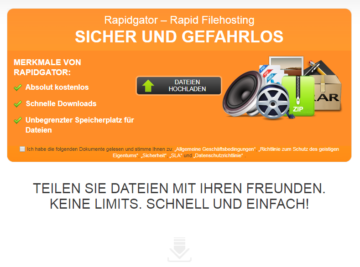
Description
Rapidgator is one of the most popular file hosters in Germany. Every day use Millions of users the service for storing files on the internet or sharing them with acquaintances. The provider has existed since 2010, and users have largely had positive experiences.
The Rapidgator Premium Account offers users unrestricted use of the service. This includes maximum download speeds, an unlimited number of simultaneous downloads, and much more. Of course, the business model is based on the typical approach used by file-hosting services. The price for the premium account starts at 8.33$ per month.
Here in this post I show Alternatives zum Rapidgator Premium Account auf. Es gibt zahlreiche Multihoster, who support the hoster. These are often cheaper and also offer access to numerous other file hosters.
These multihosters support Rapidgator
| Multihoster | Linksnappy | Offcloud | Smoozed |
|---|---|---|---|
| Download Limit | 30 GB per day | 15 GB per day | 5 GB per day |
| Accessibility | Very good | Gut | Okay |
| Price | Starting at 6,11$ per month | Starting at 5,83$ per month | from €3.33 per month |
| Download speed | Excellent | Very good | Very good |
| Payment methods | |||
| File hoster | Over 70 hosts | Over 100 hosts | Over 20 hosts |
| Test | For testing | For testing | For testing |
| Link | To Linksnappy.com | To Offcloud.com | To Smoozed.com |
1st Place Linksnappy
The Multihoster Linksnappy is in my eyes the best multihosters, if you are looking for an alternative to Rapidgator Premium Account. You can download 30 GB per day at up to 50 megabytes per second. In my experience, Rapidgator was always best accessed with Linksnappy. Unfortunately, this was not the case with all providers. Another point in favor of Linksnappy is its extensive payment options.
- 30 GB per day download limit
- Up to 50 MB/s
- PayPal and Paysafecard as payment options
- Over 70 more file hosters
Multihoster Linksnappy: Test and Experiences
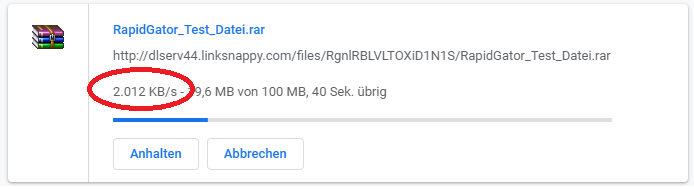
We tried to download a file that we uploaded to Rapidgator for testing using the multi-hoster Linksnappy. The test file is 100 MB in size and it took us almost 60 seconds to download. We achieved a download speed of approx. 2 MB per second and had no problems with the download. We conducted the test on March 19, 2020, at 3 PM, and of course, this is only a sample. It's possible that the download is faster or slower at other times, as our experience with Rapidgator has shown.
Update 03.01.2024: Today we could only download at 99KB per second with the Linksnappy Premium Account from Rapidgator.
2nd place Offcloud
Silver goes to Offcloud. The multi-hoster promises that you can download up to 15 GB per day from Rapidgator in premium mode. However, Rapidgator was unavailable for testing today for more than 6 hours. unreachable. Of course, this can present a big problem. Otherwise, Offcloud offers a solid service. There are numerous payment methods and extensive hoster support, most of which are also accessible.
3rd Place Smoozed
The last place in our test goes to the multihoster Smoozed. This provider has by far the lowest prices. The premium account for a whole year costs only €39.95. You can't really go wrong if you regularly use the supported file hosters. Unfortunately, Smoozed has also had problems with Rapidgator's accessibility in the past. Smoozed has discontinued its service..
Conclusion
Linksnappy is the best multi-hoster if you want to access Rapidgator regularly. All providers were just as expensive or significantly cheaper than the file hoster itself. However, what was particularly negative was the difficulty in accessing Offcloud and Smoozed. If you only need the file hoster occasionally, you should buy a Linksnappy or a cheap Smoozed account. However, if you regularly store or download large amounts of data from Rapidgator, you can't avoid a premium account with Rapidgator.
The advantages of a premium account
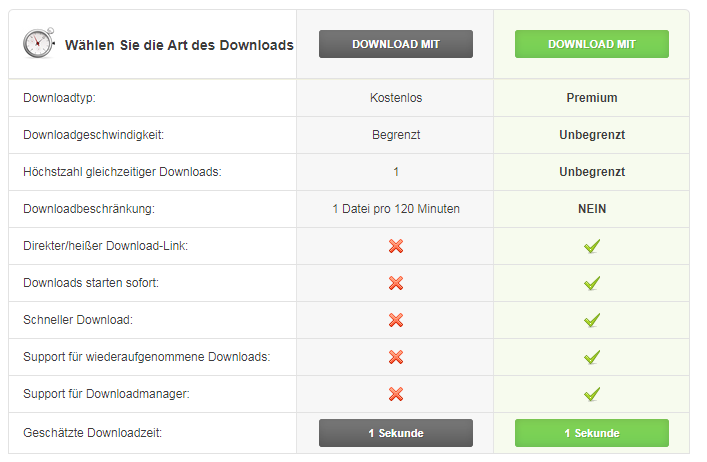
- Unlimited download speed
- Unlimited simultaneous downloads
- No waiting in line for file downloads
- No advertising
- Download files up to 5 Gigabytes
Free Account – 99 KB/s
Rapidgator's free account is very limited. To download a file, you have to accept a 45-second waiting period. After the waiting time, there's still a captcha to solve before you can start the download. The download speed with the free account is a slow 90 KB per second.
Free Account Limitations at a Glance:
- Only 90 KB per second
- 45 seconds wait time
- Solve captcha
- Only 1 download at a time
- Only 1 download in 2 hours

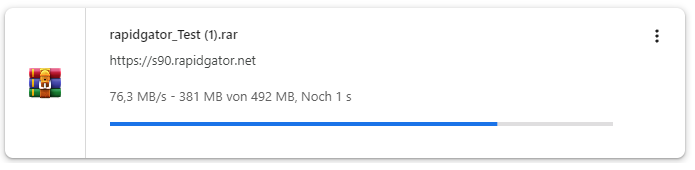
Premium Account Download 70 MB per second
With a Rapidgator Premium Account, we were able to download files at approximately 70 MB per second. The download also started immediately, and we didn't have to deal with annoying captchas or watch advertisements. So, buying a Premium Account is definitely worth it.
Upload speed test
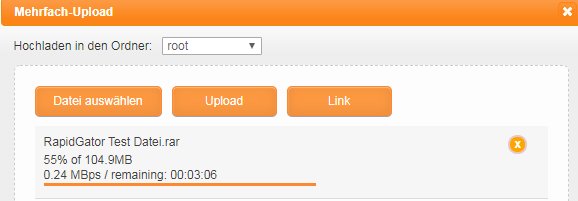
We used Rapidgator's website to upload the test file and had no problems with it. The upload took about 6 minutes, and we were able to achieve the maximum speed of our internet connection.
The cost of a premium account

Here is an overview of the costs for a Rapidgator Premium account. Prices start at 14.99$ for 30 days and go up to 99.99$ for 365 days. There are always restrictions on bandwidth as well. So if you want to download particularly large amounts of data, you’ll have to spend more money to get more bandwidth.
What one absolutely must consider is that the Premium account automatically renewed. You can, of course, turn this option off at any time. The subscription will be renewed 24 hours before the end of the period for the chosen duration.
Rapidgator Payment Methods
The file hoster offers users numerous payment methods to purchase a Rapidgator Premium Account. Visa, Mastercard, and Bitcoin are of course supported. However, those who pay with Paypal or Paysafecard If they want to pay, they must do so via a Reseller . However, the resellers charge 40% fees if you pay with PayPal, which is pretty outrageous.
The following payment methods are possible with Rapidgator (as of 01/17/2020):
- Payment by Visa and Mastercard
- Payment by Android
- Payment by Apple
- Payment by Bitcoinn
- Payment by Bitcoin Cash
- Payment by Ethereum
- Payment by Litecoin
- Payment by WebMoney
- Payment by Instant Bank Transfer
- Payment by Amazon Pay
These payment methods offer Reseller an:
- Payment by PayPal (+ 40% fees)
- Payment by Paysafecard
The payment methods are not offered:
- Payment on account
- Payment by direct debit
- Payment in installments
- Cash on delivery
- Payment by check
- Payment by cash
Support in testing and experiences
With the Rapidgator Support I unfortunately have bad experiences done. Contacting support via ticket works well and they respond quickly. Unfortunately, you couldn't Problem not solved. I had a balance of 200$, and instead of withdrawing the amount, my Account closed. Support was also able to help me and simply said that I had violated the terms of service. I find this accusation absurd, and of course I adhere to the applicable terms. Now I can no longer log in, support won’t listen to reason, the 200$ are lost, and I receive the following message whenever I try to log in. I can only advise everyone against using Rapidgator to make money or upload files.
Awaiting your input.
ACCOUNT LOCKED FOR VIOLATION OF OUR TERMS. PLEASE CONTACT SUPPORT
Frequently Asked Questions (FAQ) about Rapidgator:
Question 1: What is Rapidgator? Rapidgator is a file hosting service that allows users to upload and share files. It also offers the ability to upload and download large files.
Question 2: How do I create a Rapidgator account? To create a Rapidgator account, visit the official Rapidgator website and click on the „Register“ or „Sign Up“ option. Follow the instructions to create an account by providing your email address and a secure password.
Question 3: Is there a free membership with Rapidgator? Yes, Rapidgator offers a free membership. Users can upload, download, and share files without paying. However, premium memberships are also available with additional features and benefits.
Question 4: What are the benefits of premium membership? The Premium membership on Rapidgator offers benefits such as faster download speeds, unlimited parallel downloads, ad-free browsing, and enhanced security features.
Question 5: How do I upload files to Rapidgator? After logging in, click the „Upload Files“ option or a similar button. Select the files you want to upload and follow the on-screen instructions.
Question 6: Can I keep my uploaded files private? Yes, Rapidgator offers the option to keep uploaded files private. You can set your files to „private“ through the settings to restrict access to them.
Question 7: Are there any restrictions on file sizes and download speeds? Rapidgator has certain limitations for free users, such as restricted download speeds and maximum file sizes. Premium members, however, typically have higher limits.
Question 8: What payment methods does Rapidgator accept for premium memberships? Rapidgator accepts various payment methods, including credit cards and online payment services. The exact options may vary depending on your region.
Question 9: Does Rapidgator offer customer support? Yes, Rapidgator offers customer support through various communication channels, such as email or a support ticket system.
Question 10: Is Rapidgator safe and legal to use? Rapidgator is a legal service that allows users to store and share files. However, it is important to ensure that you only upload files that comply with legal regulations.
Please note that information may change, and it is advisable to consult the official Rapidgator website for the most up-to-date details.
Related Products







User Reviews
No reviews yet