
Description
You want to know more about Turbobit.net Premium Account know? Are you interested in the services you get from Turbobit.net? Then we can help you further below. We will clarify Turbobit.net and explain what the term means and what the difference is compared to free access. Turbobit.net is a so-called file hoster and offers a Fast File Cloud. You can store files on Turbobit.net extremely fast upload. As a file hoster, the files are available to others, and you can access files that are on Turbobit.net yourself. With this file hoster, you can choose between free access or various Turbo accesses. It's even possible to be compensated for uploaded files.
Turbobit.net – What benefits you get with Turbo Access (Premium Account)
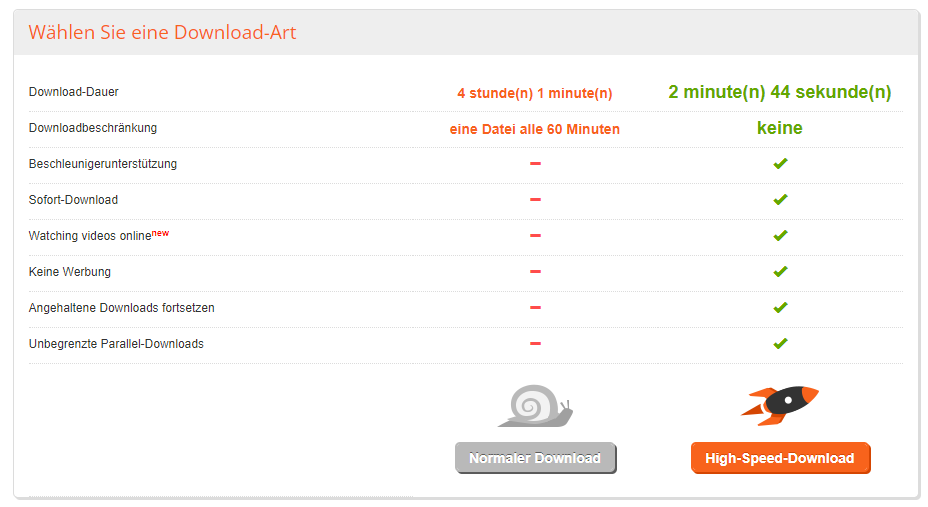
Turbo Access is a type of premium account that offers you some advantages over the free version. With Turbo Access, you can download files from the file hoster with maximum speed download. You get no ads shown and thus will not be disturbed during the download. Furthermore, Turbo Access offers you the opportunity to Download manager to use.
Another advantage is data storage. The amount of data you can store yourself in files is unlimited. Additionally, you can upload files with a single click and access them from your PC, phone, and other websites. If you want to share files, a premium account allows you to transfer files up to 100 GB. You can access your files quickly and easily via your phone or computer. With premium access, you also have different support channels available. You can contact Turbobit.net support via email or online chat. Furthermore, you can also use support tickets to get in touch.
Download Test Free Account
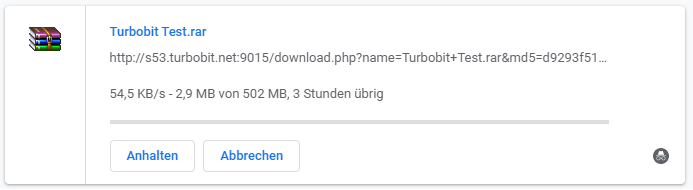
We are testing Turbobit with a free account and try to download a file. Before the download starts, we need to solve a captcha and wait for 60 seconds. The download speed is approx. 60 KB per second And we would need 4 hours for 500 megabytes.
Premiumize.me Test
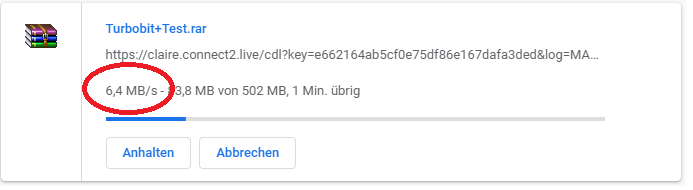
With the multihoster Premiumize.me we reached a maximum download speed of 26 MB per second. The speed corresponds to the performance of our 1,000 Mbit line. In addition, Premiumize.me supports over 40 other file hosters., Torrent files and offers a VPN. All of this is available for about €9.99 per month.
Download with multihoster Linksnappy and premium account
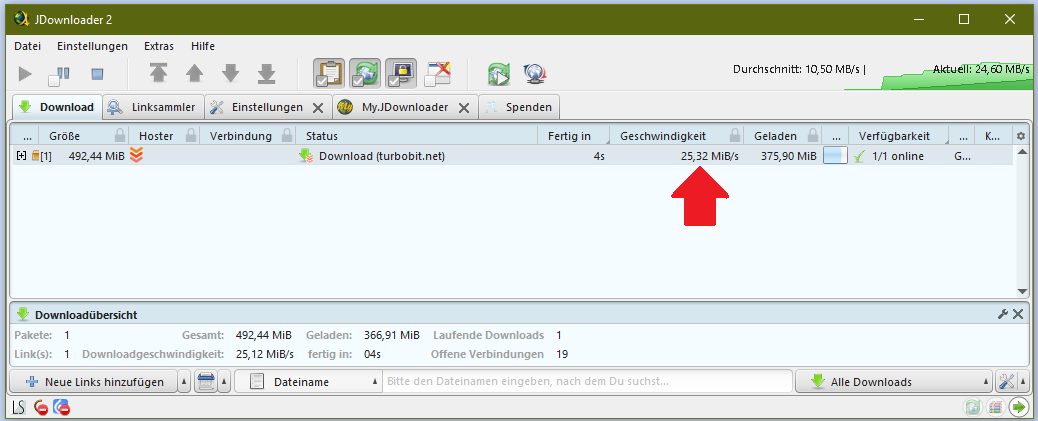
Update 7.19.2024With the multi-hoster Linksnappy we could download from Turbobit at approximately 25 megabytes per second. Our 500 MB test file was on our hard drive within seconds. We used the download manager for this JDownloader 2 is used. Of course, there is also no waiting time or annoying advertising.
What offer does the file hoster provide?
Turbobit offers free access and provides a premium account with higher download speeds. While there is advertising and forced pauses in the free access area, the Turbo access ad-free And you can use a download manager. You can also test the Turbobit.net service by uploading files without registration and for free.
If you want turbo access, you can choose from five different subscriptions. You also have the option to Bonus offers to access. You can even earn money with Turbobit by uploading and sharing popular files. Online sources state that Turbobit pays up to $40 per 1,000 downloads.
How much does the Premium Account at Turbobit.net cost?

Source: Turbobit.net
The file hoster can be used for free. In return, advertisements will be shown and there may be forced breaks. With premium access, five different subscription options are offered. You can pay $5.95 per week in the Turbo 1 offer. Or $9.95 per month in the Turbo 1-month offer. Turbo will also be 6 months for $34.95, Turbo 1 Year for $59.95 and Turbo 2 Years for $89.95 are offered. If you calculate this per day of use, you would pay $0.85 per day for the weekly Turbo 1 offer, while you would only pay $0.12 per day for the 2-year Turbo offer. The prices have been constant for over two years and there has been no price increase, which we like very much.
What payment methods are available?

Source: Turbobit.net
Payment options are very diverse at Turbobit. You can pay by PayPal, Skrill, SEURPA, as well as by VISA and MasterCard pay. You also have the option to pay anonymously with Bitcoin or Paysafecard. WebMoney, Safety Pay, Giropay, and OPENBUCKS are also offered as payment options. You can view all possible payment methods on Turbobit.net. The subscription can be automatically renewed. You decide directly during the payment process whether you want an automatic renewal. You will receive 25 % Discount, if you choose the (auto-renew) option.
File Upload Experience
In the world of file hosting services, Turbobit characterized by its impressive speed and user-friendliness. My latest test of the service on 01/01/2024 showed that uploading a 500 MB large file is a piece of cake.
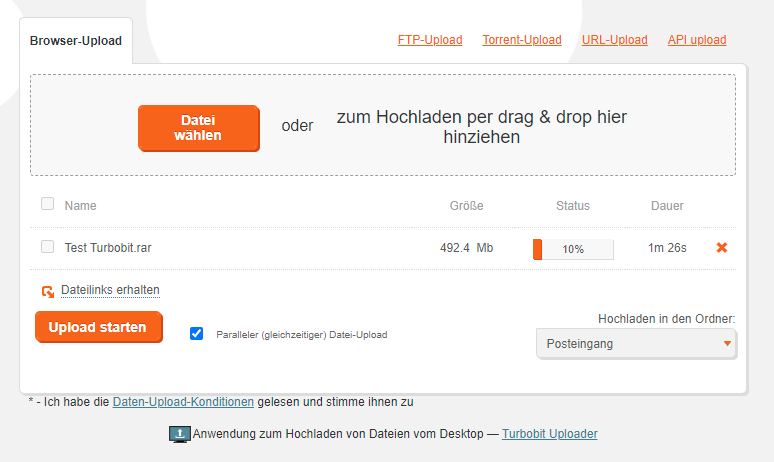
With the integrated Browser Upload Manager it was possible for me, via Turbobit, to download the file in just 1 minute and 30 seconds to upload. The speed of the process impressed me and shows that Turbobit deserves its reputation as a reliable and fast file hoster.
Turbobit offers its users various ways to upload files. In addition to the Browser Upload Manager also options like FTP Upload, URL Upload, and API Upload available. This diversity allows users to choose the path that is best suited for them.
The Browser Upload Manager significantly simplifies the process and makes uploading files a seamless experience. The clear user interface and efficient processing make Turbobit an excellent choice for anyone who values Speed and ease of use legend.
Whether you large files Whether you want to upload for personal use or business purposes, Turbobit has proven to be a reliable partner. With impressive upload speeds and various options to choose from, Turbobit offers a first-class platform for hosting and sharing files.
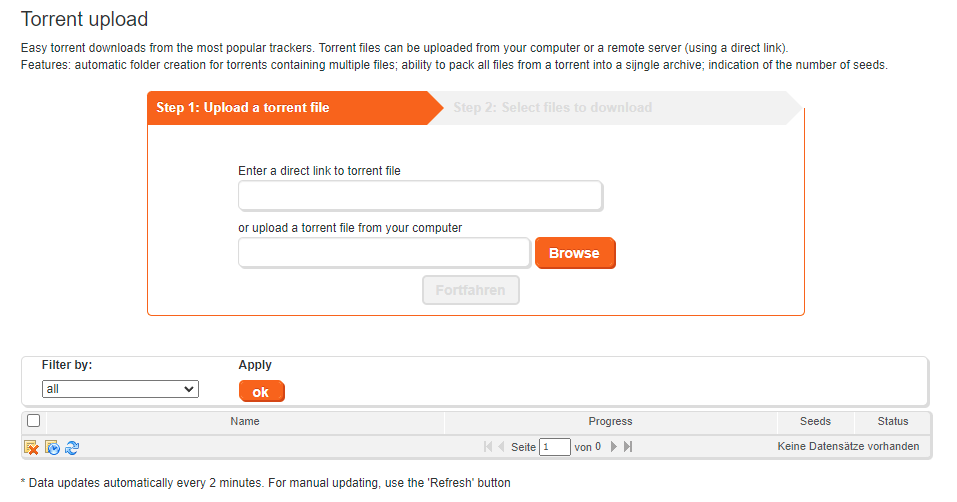
Torrent file upload to Turbobit: Uncomplicated torrent downloads
Uploading torrent files can be done either directly from your computer or even from a remote server via a direct link.
The platform shines with some impressive features, including the automatic creation of folders for multi-file torrents, the ability to pack all files from a torrent into a single archive, and a clear display of the number of available seeds.
The entire process is divided into just two steps:
- Upload a torrent file.
- Select the files you want to download.
You can either enter a direct link to the torrent file or upload the torrent file directly from your computer. The user interface has been designed to make navigating and selecting the desired files as easy as possible.
Turbobit Payment Methods
You can pay with the following payment methods on Turbobit:
- Payment by Credit card (Visa and Mastercard)
- Payment by PayPal (40% Fees)
- Payment by Bitcoin
- Payment by Paysafecard
- Payment by Instant Bank Transfer
- Payment by Amazon Pay
- Payment by Skrill
- Payment by WebMoney
- Payment by Giropay
These payment methods are not available at Turbobit:
- Payment on account
- Payment by direct debit
- Payment in installments
- Cash on delivery
- Payment by check
- Payment by cash
How secure is Turbobit.net?
 Turbobit uses encryption to ensure secure data traffic. Personal data that arises at Turbobit.net is intended to be protected from unauthorized access. However, data is stored when using Turbobit.net. The file hoster stores name and email address as well as demographic data. Demographic data is anonymized, however. The collection of data is essential for the file hoster to optimize its work processes. Turbobit.net also uses cookies.
Customer service – how can it be reached?
 Turbobit offers easily accessible customer service. You have the option to contact customer service via Skype, ICQ, and email. Support is available from 12 PM to 6 PM. A contact form is also available for you to describe your issue in detail. You can find further information about the company and user guidelines in the FAQ. You can find the questions and answers section in both Russian and English.
How is Turbobit.net structured?
 User-friendliness is important to the file hoster, which is why the website is clearly designed. You immediately have the option to Testing file uploads, without needing to create an account. You'll also get an overview of the Premium Account offers and can choose the right subscription for you. You can also easily upgrade from free to Turbobit Premium.
To test uploading via Turbobit.net, you do not need to register. You can select the files you want to upload directly using the „Choose File“ menu option. You can also drag and drop files into the uploader. The website also offers the option to access the "Make Money" and "Turbo Access" menu items. Under the "Turbo Access" menu item, you will find the subscription options.
How much Make money with Turbobit can, that will be under the menu item Make Money provided. If you have uploaded files, you can manage them in the „My Files“ menu item. You should read reviews of Turbobit.net before choosing a premium account and inform yourself further about the file hoster.
With VPN and Turbobit: Security and Anonymity
In today's interconnected world, using a Virtual Private Network (VPNincreasingly important to protect online privacy. In this context, it proves Turbobit as a file hoster, as a first-class choice for securely and efficiently sharing files.
A VPN allows users to encrypt their internet connection and protect their identity online. This is especially important when sharing sensitive files. Turbobit This complements this security approach by providing a reliable platform for uploading and downloading files.
The combination of VPN and Turbobit opens up a variety of advantages. By using a VPN, the connection between the user and the Turbobit-Server is encrypted, which ensures the security of transferred files. At the same time, you benefit from the speed and user-friendliness of Turbobit-service that makes sharing large files a smooth experience.
In a time when data protection and security on the internet are of paramount importance, the combination of VPN and Turbobit an optimal solution. It not only enables secure file exchange but also ensures efficient and straightforward use of the file hosting service.
Conclusion on the Turbobit.net test
Turbobit.net is a file hoster that offers fast data upload and download. The file hoster provides a free trial option for uploading. Furthermore, free access is offered, which provides file hosting with advertising breaks. In the Premium account, a fast Turbo access and five subscriptions are available. The Premium access offers upload and download without advertising and forced breaks.
Related Products








User Reviews
No reviews yet