Description
In this test, we'll take a look at which Support for multi-hoster Keep2Share (K2s.cc). The file hoster K2S is becoming increasingly popular in German-speaking countries and, in my experience, offers a very good service. What immediately strikes us is the relatively high price. The Keep2Share Premium Account costs for 30 days 23,94$ and the Premium Pro Account even 29,94$. Now let's ask ourselves: Which multi-hosting services support Keep2Share?
I've tested almost 20 multihosters and checked the hoster lists. Linksnappy and Premiumize are now the only multihosters I know of that support Keep2Share. All other providers no longer support Keep2Share. One thing, however, must be mentioned. The download volume is limited to 10 GB per day. This is mainly due to the relatively high costs of a Keep2Share Premium Pro account.
Linksnappy and Keep2Share
The Multihoster Linksnappy In our opinion, it is the best multi-hoster on the market. It offers a high and constant download speed, an extensive range of hosters, and many different payment methods. Linksnappy also supports Keep2Share. You can up to 10 GB per day Download with a Keep2Share Pro account.
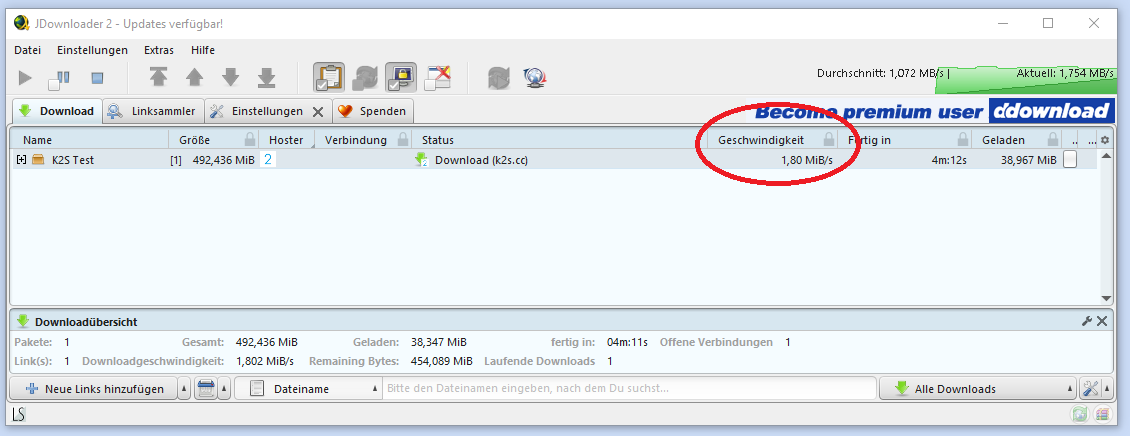
Update 01/14/2025: The download started immediately, and in our test, the speed was up to 40 MB per second.
Conclusion: Linksnappy or Premium Account at Keep2Share
Very few multi-hosters support the one-click hoster Keep2Share. However, the daily download volume is low. If you plan to download large amounts of data from the file hoster, you should buy a Premium Account or a Premium Pro Account directly from Keep2Share.
I can most recommend Linksnappy. The provider is a solid multihoster and offers other benefits. If you also regularly download from other file hosters like Turbobit, DDownload, or Filer, a premium account is definitely worth it.
Buy Keep2Share Premium Account
What is Keep2Share? 🧵
Keep2Share is a popular File hosting service, which allows users to file to upload, to save and share with others. Whether you want to send large files or simply back up your data in the cloud – Keep2Share offers a simple solution for it.
Features and Benefits of Keep2Share 🚀✨
1. Free vs. Premium Version 🌟
- FreeLimited download speed, wait times before downloading, and limited storage space.
- Premium: No waiting times, high download speed and unlimited storage for your files.
2. User-friendliness 💡
The user interface is intuitively designed – uploading and sharing files is super easy. The Upload and Download Process is done in just a few clicks.
3. Security aspects 🔒
Keep2Share places great emphasis on security:
- SSL encryption for secure data transmission.
- Password protection for shared links.
- The data will be on secured servers saved.
4. File sizes and formats 📁
- No file size limit in the premium version.
- Supports all common file formats.
Speed and Reliability
In testing, Keep2Share impresses with fast download speeds (especially in the premium version). Also large files can be uploaded and downloaded without any problems.
Is Keep2Share legal? 🚫📡
The Using Keep2Share is legal in itself. BUT:
- nature of User responsibility, Do not upload or share copyrighted content without permission.
- The file hoster is under surveillance in some countries because it is often used for sharing pirated copies.
Alternatives to Keep2Share 🛠️
If you're looking for alternatives, here are a few options:
- DDownload.com: similar in functionality and price.
- RapidgatorKnown for fast downloads.
- Mega.nzOffers 50 GB free storage and strong encryption.
Multihosters that do not support Keep2Share
In my research, I noticed that most providers do not support Keep2Share. The following multi-hosters do not support Keep2Share (as of January 15, 2020). The list could probably be supplemented by various other providers, but that would probably go beyond the scope of this.
- Offcloud
- Premium.to
- Simply-premium.com
- Debriditalia.com
- Alldebrid.com
- Premiumax.net
- Real-debrid.com
- Debrid-link.fr
- FFdownloader.com
- Mega-debrid.eu
- Multishare.cz
Free, Premium Pro Account, Premium Max Plan Compared
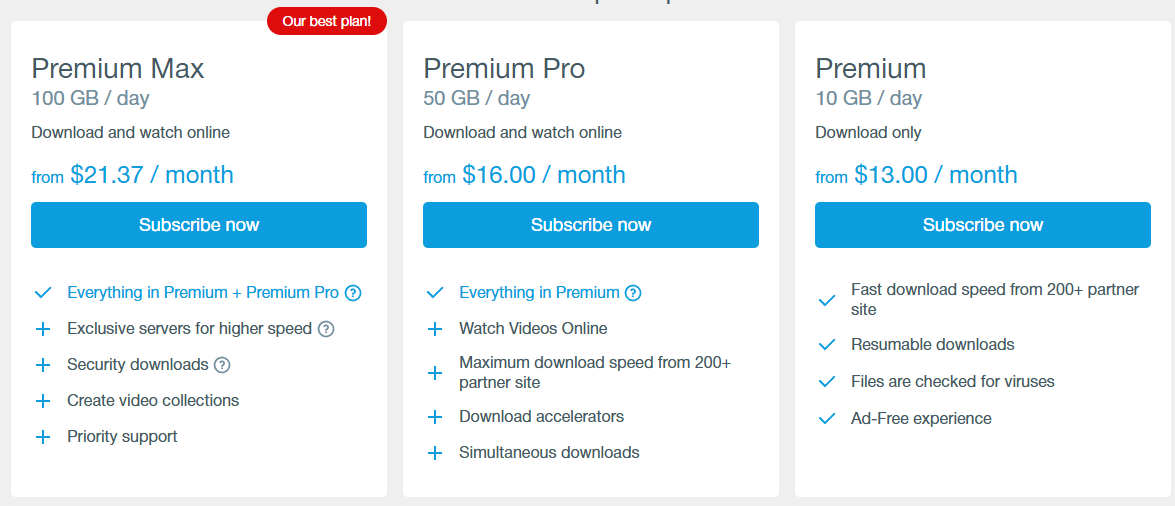
Keep2Share (K2S) offers three different subscription plans, which vary in price, features, and download limits. The Premium-Plan is the entry-level plan and starts at $13.00 per month. It allows for daily downloads of up to 10 GB, offers fast download speeds from over 200 partner sites, the ability to resume downloads, ad-free access, and a virus scan for the files. The Premium Pro-Plan builds on this and expands the $16.00-per-month plan to 50 GB per day. In addition to the premium features, it enables online video streaming, supports download accelerators, and allows simultaneous downloads. The top plan is the Premium Max-Plan for $21.37 per month. This plan includes 100 GB of download volume per day as well as exclusive servers for even faster speeds. In addition to all the benefits of the previous plans, this plan offers more secure downloads, the ability to create video collections, and priority support. All plans are currently available without a discount
| Free Account | Premium Account | Premium Account PRO | |
|---|---|---|---|
| Waiting time | 5 seconds | No waiting | No waiting |
| Download Speed | 50 KB/second | High download speed | Maximum Download Speed |
| Download Limit | up to 4GB per day | up to 20GB per day | up to 50GB per day |
| Downloads | One download at a time | Multiple downloads simultaneously | Multiple downloads simultaneously |
| 3 days | 0 | 6,95$ for 3 days | 8,95$ for 3 days |
| 30 days | 0 | 16,951 TP4T per month | 21.95€ per month |
| 90 days | 0 | 13,981 TP4T per month | 17,321 TP4T per month |
| 365 days | 0 | 9,501 TP4T per month | 11,751 TP4T per month |
Keep2Share (K2S) Subscription Plans Compared 🚀
Premium 💾
- Price: Starting at $13.00/month
- Download limit: 10 GB/Tag
- Features
- Fast downloads from 200+ partner sites ⚡
- Download only (No streaming) ⬇️
- Resumable Downloads 🔄
- Files are being scanned for viruses 🛡️
- Ad-free usage 🚫📢
Premium Pro 🎥
- Price: Starting at $16.00/month
- Download limit: 50 GB/Tag
- Additional features Premium:
- Watch online videos 📺
- Maximum download speed from 200+ partner sites 🚀
- Support for Download Accelerators ⚙️
- Simultaneous downloads possible 🔃
Premium Max 🏆
- Price: Starting at $21.37/month
- Download limit: 100 GB/Tag
- All functions of Premium Pro plus
- Exclusive Servers for even higher speeds 🌐
- Secure Downloads with additional protection 🔒
- Video Collection Creation film reel
- Priority Support for quick help access 🎧
All plans are currently available without a discount. Whether you only want to download files occasionally or are looking for maximum performance – you'll find the right plan for you!
Upload speed test
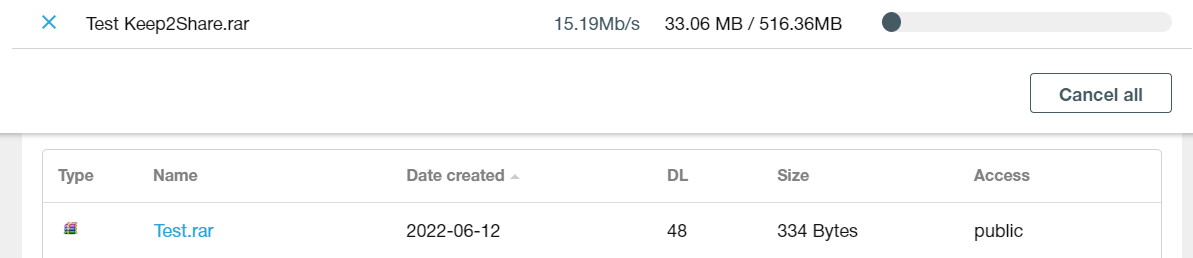
Uploading files works smoothly on Keep2Share's website. After you Terms of Use Accepted, you can upload your files at full speed. I achieved an upload speed of 3.5-4 Mbit per second. This corresponds to about 0.5 MB per second. The 500 MB were uploaded in about 15 minutes. Uploaded files are deleted after 90 days.
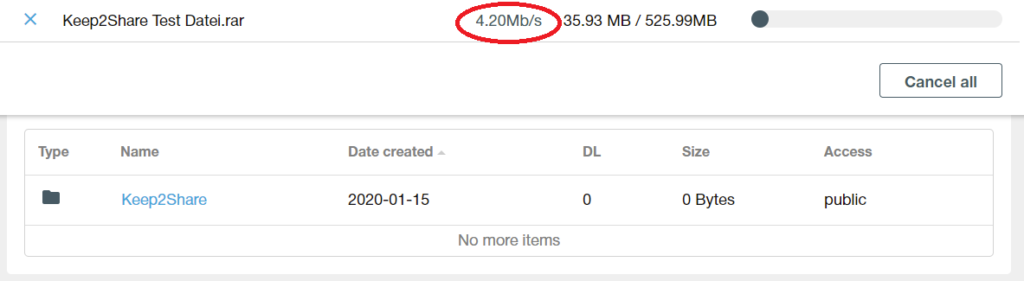
Update 01.01.2024: I retested the file upload today with a faster internet connection and was able to upload my files at up to 17 megabytes per second.
Forbidden files
This content may not be uploaded to Keep2Share.
- Goodbye
- defamatory
- Interference with another person's privacy
- graphically violent or likely to incite immediate violence
- Advocacy or promotion of terrorism
- Offering or facilitating illegal arms sales
- racist
- physically threatening or intimidating
- for illegal purposes
- Content from Ravenous Entertainment
- Pornography
Payment Methods for Keep2Share Premium Account Pro
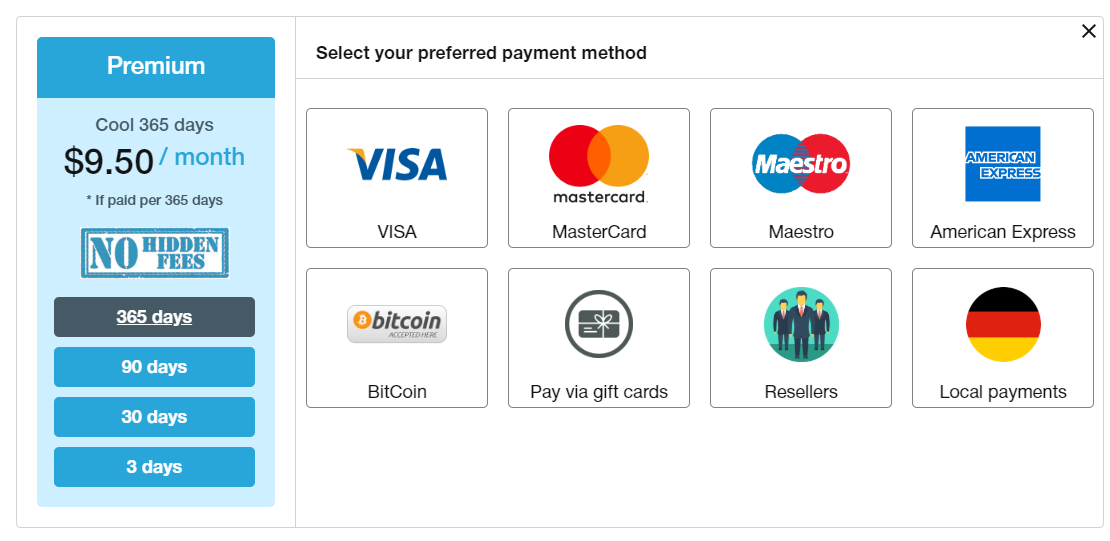
The Keep2Share Premium Account or Pro Account can be purchased with various payment methods. However, with Paysafecard or PayPal, you can only pay through resellers.
The following payment methods are available (as of January 15, 2020):
- Payment by Credit card
- Payment by Bitcoin
- Payment by American Express
- Payment by Voucher
- Payment by Instant Bank Transfer
- Payment by Amazon Pay
- Payment by Neteller
- Payment by Handy (SMS)
- Payment by WebMoney
These payment methods offer Reseller an:
- Payment by PayPal
- Payment by Amazon Pay
- Payment by Paysafecard
The payment methods are not possible:
- Payment on account
- Payment by direct debit
- Payment in installments
- Cash on delivery
- Payment by check
- Payment by cash
Conclusion
Keep2Share is one of the most expensive file hosters and is only supported by a few multihosters. I had the best experiences with Linksnappy. If you want to download files from K2Share regularly, it's best to get a premium account directly from Keep2Share itself.
Frequently Asked Questions (FAQ) for Keep2Share:
- What is Keep2Share?
- Keep2Share is a file hosting service that allows users to securely store files in the cloud and easily share them with others.
- How do I create a Keep2Share account?
- Visit the official Keep2Share website and click „Register.“ Enter the required information and follow the instructions to create your account.
- You can upload various file types to Keep2Share, including:
* **Documents:** DOC, DOCX, PDF, TXT, RTF, ODT, XLS, XLSX, PPT, PPTX, CSV, etc.
* **Images:** JPG, JPEG, PNG, GIF, BMP, TIFF, PSD, SVG, etc.
* **Audio:** MP3, WAV, FLAC, AAC, OGG, WMA, etc.
* **Video:** MP4, AVI, MOV, MKV, WMV, FLV, WEBM, etc.
* **Archives:** ZIP, RAR, 7Z, TAR, GZ, etc.
* **Executables:** EXE, DMG, APK, etc. (though often scanned for viruses)
* **And many other common file formats.**
Keep2Share generally supports most standard file formats.
- Keep2Share supports a variety of file formats, including documents, images, videos, and music. However, please refer to the terms of service to ensure your files comply with the guidelines.
- How do I upload files to Keep2Share?
- Log in to your account, click „Upload,“ and select the files you want to upload. Alternatively, you can use the desktop or mobile client.
- Are there file size restrictions?
- Yes, there are file size limitations, which may vary depending on your account type. Check the details on the Keep2Share website.
- Can I share my uploaded files?
- Yes, you can share your uploaded files via links. Keep2Share offers various sharing options, including public and private links.
- Keep2Share has implemented the following security measures:
* **Secure data transfer:** All data transfers are encrypted using SSL/TLS protocols.
* **Data encryption:** User data is encrypted at rest using AES-256 encryption.
* **Regular security audits:** Keep2Share undergoes regular security audits to identify and address potential vulnerabilities.
* **Access control:** Strict access controls are in place to ensure that only authorized personnel can access user data.
* **Malware scanning:** All uploaded files are scanned for malware to prevent the spread of viruses and other malicious software.
* **DDoS protection:** Keep2Share employs measures to protect its services against distributed denial-of-service (DDoS) attacks.
* **Secure server infrastructure:** The company utilizes a secure server infrastructure with robust physical and network security measures.
- Keep2Share uses various security measures, including SSL encryption, to ensure the security of your uploaded files. Please read the privacy policy for more information.
- How can I access my files from different devices?
- You can access your files through the Keep2Share website or the official mobile app. Install the desktop client to manage files directly from your computer.
- Does Keep2Share offer a free membership?
- Yes, Keep2Share offers both free and paid memberships. The paid memberships provide additional features and increased storage capacity.
- How can I contact Keep2Share support?
- For questions or problems, you can reach Keep2Share support via the contact form on the website. Please also refer to the available documentation and FAQs for further assistance.
Note: The information in this FAQ is subject to change. Please check the official Keep2Share website regularly for the latest updates and policies.
Related Products






User Reviews
Comments
Susi Carefree 12. April 2020 um 23:34
As of today (April 12, 2020), Linksnappy *does not* support K2S!
According to support, only cached files are being delivered.
Mr. Jones 1. January 2021 um 22:16
K2S is not supported by Smoozed (as of 01/01/2021)