Description
The file hoster Filefactory is a seasoned veteran in the one-click hosting scene. The company has been around since 2005 and has continuously expanded its services. It's now possible to upload and download files up to 5 GB in size. You can generally use your Filefactory account for free, but there are limitations, especially for downloading large data sets do you absolutely need a Premium Account or an account with a Multihoster, to be able to use the unlimited download speed.
Particularly negative is the fact that one can neither Paysafecard, Bitcoin or PayPal pay for. The only Payment Options are Visa, Mastercard, and American Express.
- 13$ for 30 days of Premium
- Filefactory supports JDownloader
- Direct Download with Premium Account
- 100 GB free traffic share
Filefactory.com Download Test
We are testing the file hoster Filefactory with various multi-hosters and a free account with the provider. For our Test have a 500 MB file uploaded at Filefactory and use our 50 Mbit line with a maximum download speed of approx. 7 Megabytes per second. For the test, we are not using any VPN or similar, so as not to distort the result.
Free Account Download Test
We are testing Filefactory first with the free account and see how fast the download is. After waiting 60 seconds, you can start downloading.
Download Update 2024: With the free Filefactory account, I was able to download at over 500 kilobytes per second today.
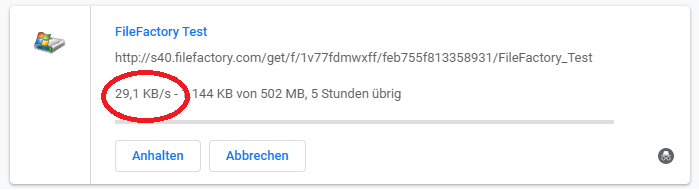
You can forget about the speed with a free Filefactory account. It fluctuates between 10-50 Kilobytes per second. To download the approximately 500 MB test file, it takes 4-5 hours.
LinkSnappy Multihoster Download Test
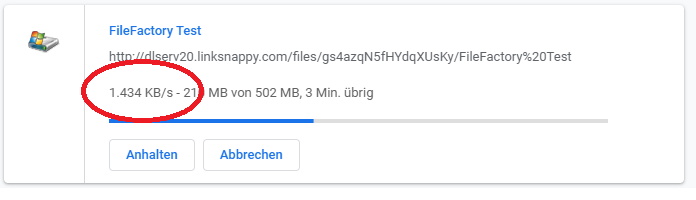
With the Multihoster Linksnappy works much better. With the website's download manager, the speed fluctuated between 400 and 2,600 kilobytes per second. We were able to download the 500 MB in about 6 minutes. A Premium account with Linksnappy also costs 13$ for 30 days. In addition, Linksnappy supports over 50 other file-hosting sites, including Uploaded.net, Turbobit, and Oboom. If you only download files from Filefactory every now and then, then recommend how to get an account with the Multihoster Linksnappy to buy.
- Update 07.15.2020: We just tested Filefactory again with Linksnappy and were able to download at 3-5 MB per second. We used JDownloader 2 and a premium account from the multi-hoster Linksnappy for this.
- Update 07.31.2020: We were just able to download again at approximately 5.5 megabytes per second with Linksnappy. The speed remains constant at that level.
- Update 10/27/2020: In the latest Filefactory download test, we were able to reach 18 MB per second with Linksnappy
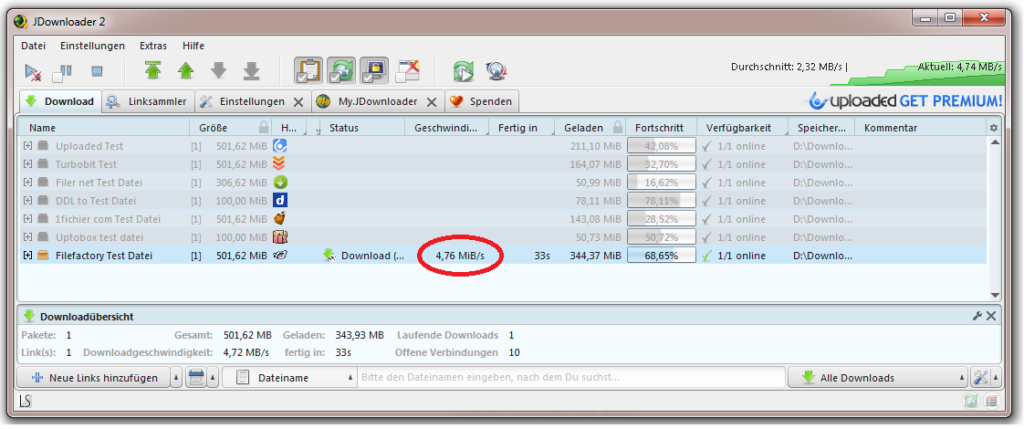
Test from 15.07.2020 with the multihoster Linksnappy
Premiumize.me Download Test
We are also testing the Multihoster Premiumize.me. The download started immediately, but the download speed was very slow. It fluctuated between 20-50 Kilobytes per second. That's a disappointing result. We might run the test again in a few weeks to see if anything has improved.
Update 03/25/2020: Error starting download
Today we tried to access Filefactory.com with Premiumize.me again. However, we only received the error message: „Error starting Download“. Those who want to regularly download files from Filefactory should probably purchase a premium account directly from the file hoster.
Linkifier Test | Speed
Wow, the download started right away, but the download speed is a bad joke. We were barely able to get the file with 3-4 KB per second download. We would need 1-2 days for the download. Linkifier support is virtually non-existent and we cannot recommend the multi-hoster for Filefactory due to the slow download speed.

Upload Test
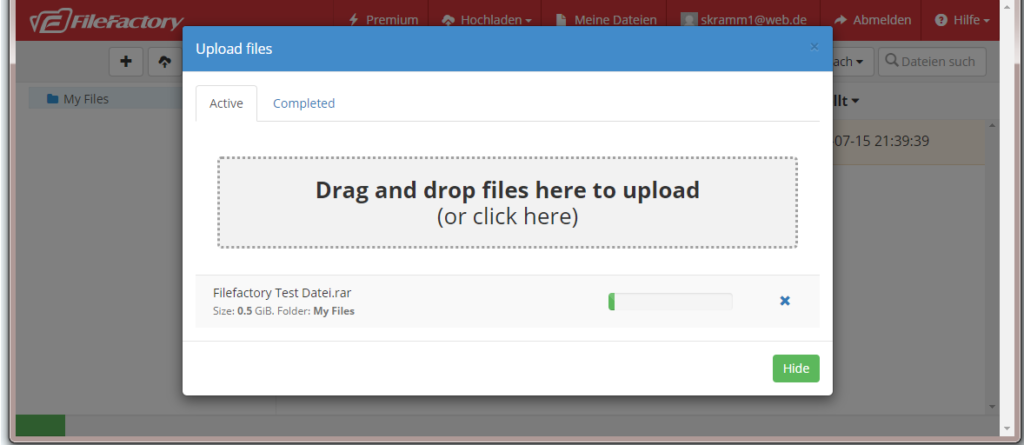
File uploads work without any problems and can easily be done via drag and drop in the browser. We only needed a few minutes for the 500 megabyte test file. You naturally also have the option to upload files remotely or via FTP. However, files are only stored for 30 days with a free Filefactory account. If you want to play it safe and have unlimited access to the files, then you should buy a premium account.
Advantages of a premium account
Especially the unlimited download speed and the removal of all waiting times and limits makes a premium account very interesting. With a free account, you can only download one photo or one ebook in a reasonable amount of time. For every file larger than 20 MB, we strongly recommend a Premium Account or one Multihoster Account. It's best to take a look at our Multihoster Comparison a.
| Premium Account | Free account | Without registration | |
|---|---|---|---|
| Download speed | Unlimited | Up to 100KB/s | Up to 50KB/s |
| Parallel Downloads | Unlimited | Only 1 Download | Only 1 Download |
| Data Storage | Unlimited | 30 days | Not possible |
| Maximum upload size | 5 GB | 5 GB | Not possible |
| Maximum download size | 5 GB | 5 GB | 5 GB |
| Direct Downloads | Yes | No | No |
| Waiting time | No waiting | Normal waiting time | Long wait |
| Continuing download | Yes | No | No |
| Download Manager | Yes | No | No |
| Banner ads and pop-ups | No advertising | Little advertising | Lots of advertising |
| Upload via FTP | Yes | No | No |
| Preferred Customer Support | Yes | No | No |
The payment methods PayPal and Bitcoin
The payment methods offered are limited to Credit cards from Visa and Mastercard. For many users, this is the biggest point of criticism.
When it comes to confidential data or activities in a grey area, one wants to be able pay anonymously can. There is no option directly on Filefactory, but there are numerous resellers where you can pay anonymously with Paypal or Bitcoin.
The following Payment options offered by Filefactory:
- Payment by Credit Card (Visa, Mastercard, American Express)
These payment methods are offered by resellers:
- Payment by PayPal
- Payment by credit card
- Payment by bank transfer
- Payment by Bitcoin Altcoin
- Payment by UnionPay
- Payment via WeChat & Alipay
- Payment via WebMoney
These payment methods are not supported:
- Payment via Sofort
- Payment by Paysafecard
Support
The support at Filefactory.com seems exemplary. There is a live chat and an extensive FAQ page. That should be enough to answer all questions.
Conclusion
The file hoster Filefactory offers a solid package and impresses with its speed and website. The major drawback is the limited payment options. You only have the choice between different credit cards and cannot pay anonymously.
The free Filefactory account offers a very slow download speed and is just enough to download an ebook or a photo. For larger files, we strongly recommend purchasing a premium account.
Those who only access the service occasionally are best off getting a premium account with them Multihoster Linksnappy. The download started immediately and there were no problems. The download speed was good, and the account costs the same as a Filefactory premium account. Linksnappy.com however, you still get support from over 50 additional one-click hosters.
Easter Discount Sale
Currently, there is a discount promotion for Easter from Filefactory.com. The promotion is valid until April 15, 2020, and you need to No voucher.
- 1 year of Premium costs 49$ (you'll save 45$)
- 2 years of Premium costs 89$ (you'll save 99$)
- 5 years of Premium costs 199$ (you'll save 271$)
- Lifetime Premium costs 249$ (you'll save $$$)
Filefactory.com FAQ
What is Filefactory.com?
- Filefactory.com is a file hosting service that allows users to upload, store, and share files. It offers various features for secure online file exchange.
2. How do I upload files to Filefactory.com?
- There are several options:
- Web Upload Log in to the website and upload files directly through the browser.
- FTP (File Transfer Protocol): Use an FTP client to upload files to Filefactory's servers.
3. Are there any restrictions on file sizes or file types?
- The exact limitations may change. Typically, free accounts have limited storage capacity, and there may be restrictions on individual file sizes. Premium accounts usually offer larger storage and upload capacities.
4. What file management features does Filefactory offer?
- Filefactory allows for organizing files into folders, renaming files, and creating shareable links for easy exchange.
5. Does Filefactory support remote uploading of files?
- Yes, Filefactory offers the possibility of remote uploads, where you can transfer files directly from other URLs to the platform.
6. Is there an API for developers?
- Information about a possible API can be found on the official Filefactory website or in their documentation.
7. What security measures does Filefactory offer?
- Filefactory.com typically offers encryption and other security measures to protect uploaded files. It is recommended to review the service's privacy policy.
8. How can I contact Filefactory customer support?
- Customer support contact options can usually be found on the official Filefactory website.
9. What are the benefits of a Premium account on Filefactory?
- A premium account typically offers benefits such as faster download speeds, larger storage capacity, and additional features compared to free accounts.
10. What payment methods are accepted for a Premium account? Filefactory typically supports various payment methods, including credit cards, PayPal, and others. Check the website's payment information for current options.
Related Products







User Reviews
No reviews yet