Turbobit Experiences After 6 Years – Is Premium Really Worth It?
For over six years I have been using Turbobit regularly to download large files from the internet quickly and securely.
I first discovered the service in 2019 – back then, through forums where files stored on Turbobit were frequently shared.
In the meantime, I have the platform both in free mode and with premium access, and across various Multihoster how LinkSnappy used.
In this article, I'll share my honest experiences – from slow free downloads to ultra-fast premium speeds.
What is Turbobit anyway?
Turbobit.net is an international file hoster that specializes in Uploading and downloading large files specialized.
Users can store, share, and access files on the servers from anywhere.
Turbobit offers two access options:
Free Account: free but heavily restricted
Premium Account paid, with full speed and comfort
For years, Turbobit has been one of the best-known file hosters in Europe, mainly due to its stable servers, high download speeds, and ease of use.
Go to Turbobit.net now and test the file hoster.
My first years with the free account
My first experiences with Turbobit were – honestly – laborious.
As a free user, I had to accept long waiting times before a download could start.
Additionally, the speed was severely limited:
Downloading 500 MB could easily take an hour.
Turbobit in free mode is therefore more of a Emergency solution - suitable if you only need a small file and have patience.
Downloading multiple files one after another is almost impossible because the waiting times between downloads are significantly increased.
The switch to Premium – a real game-changer
After a few months in free mode, I finally got to the Premium access changed over.
And that was a quantum leap in terms of speed and comfort.
In premium mode, you can:
download multiple files at once,
den full speed of your own internet connection use,
and skip all wait times.
With Premium, a 10 GB download only takes a few minutes – often under 10 minutes for me.
I usually use the JDownloader, which works perfectly with Turbobit.
Later, I also Turbobit through Multihoster how LinkSnappy used – this is ideal if you regularly download from multiple file hosts.
The speed remains top, and you save yourself additional premium subscriptions.
Performance and Stability
In six years of use, I had almost never problems with stability.
Turbobit servers are reliably accessible, connections remain stable, and there are no interruptions even with large files.
It is precisely in the premium sector that one notices that Turbobit works in a technically clean manner.
The service isn't spectacularly modern, but it's technically mature and solid.
Operation & User Experience
The Turbobit user interface is Clear and functional.
You log in, immediately see your files, the traffic limit, and the remaining subscription time.
Admittedly, the design looks a bit old-fashioned, but everything works smoothly – and ultimately, that's more important.
I use Turbobit almost exclusively on my PC, as I don't use mobile uploads or apps.
For desktop users, the interface is optimal.
Value for money
I find the price-performance ratio of Turbobit to be very good.
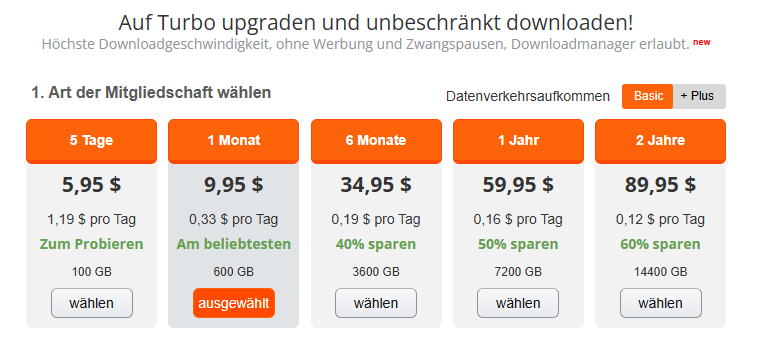
The rates are fairly designed and offer flexibility:
5 days: 6 USD
1 month 10 US Dollars
12 months $59.95 USD
This makes Turbobit one of the cheaper file hosters, especially if you regularly download large amounts of data.
Anyone who actively uses their account will get here A lot of speed for little money.
I myself switch between premium access and Multihoster, depending on how often I need files.
Both work great.
Support & Reliability
I had contact with the several times over six years. Turbobit Support – always via the ticketing system on the website.
The responses came within 24 to 48 hours, friendly and helpful.
Problems were resolved quickly, for example, with payment issues or account access.
Overall, the support reliable and professional, which is not a given with international file hosts.
Security & Payment Methods
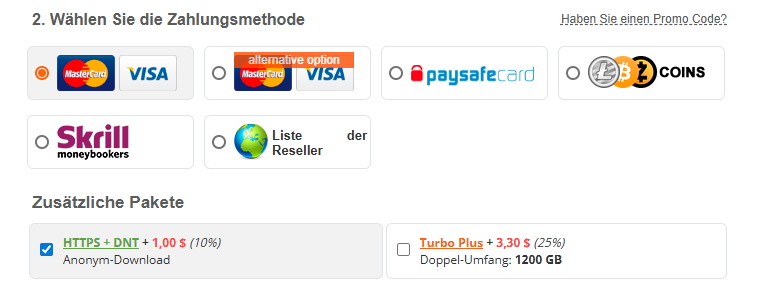
Turbobit offers various secure payment options:
Credit card
Cryptocurrencies (e.g., Bitcoin)
Reseller
occasional prepaid cards
I have over the years no problems with payments or account closures experienced.
The login is encrypted, and the service is operating stably.
I've never had any virus warnings or security concerns.
Turbobit feels to me overall trustworthy – especially in premium mode, where you pay with personal data.
Comparison: Turbobit vs. Multihosters (e.g., LinkSnappy)
I have Turbobit both directly and via Multihoster how LinkSnappy is used – and both variants have their advantages.
| Feature | Turbobit Premium | LinkSnappy (Multihoster) |
|---|---|---|
| Download speed | Very high, full bandwidth | Very high, varies slightly depending on the host |
| Flexibility | Only Turbobit | Access to many file hosters |
| Value for money | Inexpensive with regular use | Optimal when using many hosts |
| Reliability | Very stable | Also stable, occasional host updates |
| Comfort | Simple, direct | Centralized login, everything in one place |
Here's my conclusion from the comparison:
When you regularly hear Turbobit itself If you plan to upload, the premium account is absolutely worth it.
If you use many different file hosters, a Multihoster how LinkSnappy the better solution – because you cover multiple providers with a single account there.
Pros and cons of Turbobit
Advantages:
Very high download speed in premium mode
Stable servers, hardly any downtime
Affordable rates with flexible access
Easy operation and reliable support
Ideal for large files
Disadvantages
Free account barely usable
Monthly traffic limit (e.g., 600 GB for Basic, 1200 GB for Plus)
Something old-fashioned interface
Conclusion: My Turbobit Experience After 6 Years of Use
After more than six years with Turbobit, I have a positive conclusion.
The service is reliable, fast, and affordable – especially in premium mode.
For anyone who regularly downloads or shares large files, Turbobit is an excellent choice.
With a Multihoster like LinkSnappy, usage can be further expanded, but those who focus on Turbobit get a proven, stable platform with a strong price-performance ratio.
After six years, I can say: Turbobit isn't the prettiest, but it's one of the most reliable file hosters on the market.
Note:
This article reflects only my personal experience.
I recommend always using file hosts Framework of applicable copyright laws.
Downloading or sharing copyrighted content without permission from the copyright holder is not allowed.









No Comments found