Description
UptoBox Download Test
We're looking at the file hoster Uptobox.com more closely and test it with multiple multihosters. To do this, we have a 100 MB Test File uploaded to Uptobox and you download with it free account and the multi-hosts. We have a 50 Mbit line available and use the Google Chrome browser. We do not use a VPN or anything similar to avoid distorting the results. Of course, it is possible that we rate a provider too well or too poorly, as we only take random samples. Anyone who has other Experiences If you have done this with UPtobox or the multi-hosters, please write it in the comments.
There is currently an important incident. The servers of the file hoster Uptobox were apparently seized and are no longer accessible. The file hoster itself wrote this on Twitter (X). As of 2025, the file hoster is still offline.

Free Account Trial
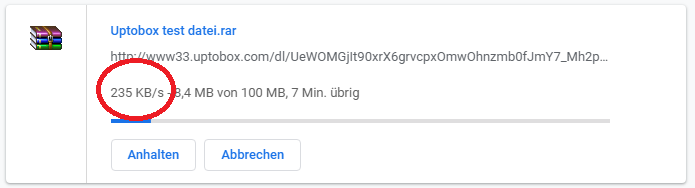
Before we could start the download, we first had to 30 second wait bridge and watch annoying ads. 3 clicks and 3 pop-up ads later, the download could finally begin with the free account. The speed varied between 150 and 250 Kilobytes per second And is compared with others Filehoster Not bad. So the free account is enough to download an audiobook or an e-book. For a 100 MB file, it takes about 8 minutes.
Multihoster Linkifier
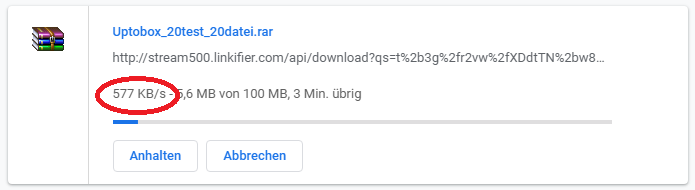
Next, we have the Multihoster Linkifier tested and downloaded the file from Uptobox. Unfortunately, the result was disappointing and we could only achieve a download speed between 250 and 650 Kilobytes per second download. Downloading the 100 MB test file from Uptobox took approximately 6 minutes. If you only want to download small files occasionally, such as a movie or a CD, then an account with the multi-hoster might suffice. If you plan on downloading larger amounts of data, it would be better to buy a premium account directly from Uptobox.
Update Linkifier 10.03.2020
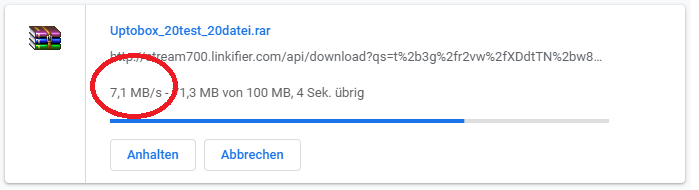
We tested Uptobox again with the multihoster Linkifier and were able to reach the maximum speed of our internet connection today. The download started immediately and the file was downloaded within a few seconds. We achieved an average download speed of 7 MB per second.
Linksnappy Premium Account (new)
Finally, we have a 250 Mbps internet connection and were just able to [complete/start/etc.] with sensational 27 megabytes per second download from Uptobox. For the test, we have a Linksnappy Premium Account used. Linksnappy is a multi-hoster and you can access many different file hosters and only pay a few dollars more per month.
Multihoster Linksnappy (alt)
The download started immediately, but perhaps we had a bad day. The download speed was very slowly and we could only from UptoBox with 120 Kilobytes per second download. For this, an account with the multihoster is not worth it, and you would rather save the money. Of course, you have the advantage that No waiting time hat und no ads It's coming, but the speed is just too slow. We'll repeat the test again in a few days to get a meaningful result.
Update 2022: With a 50 Mbit line, I was able to download from UptoBox today at almost full speed. I used JDownloader 2 and a premium account for the multi-hoster Linksnappy for this.
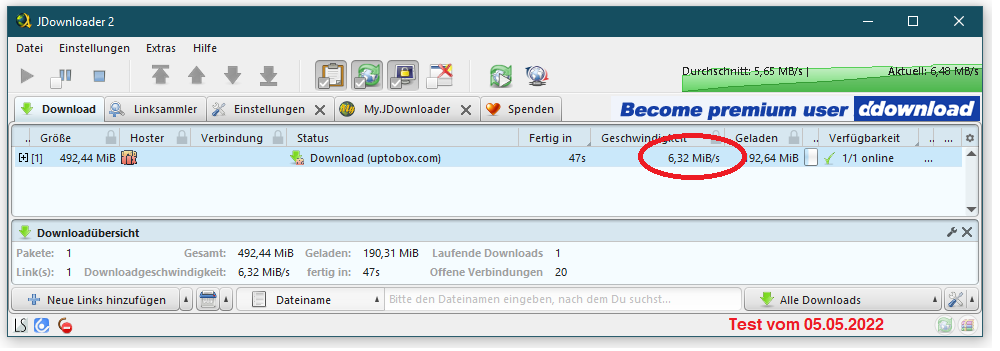
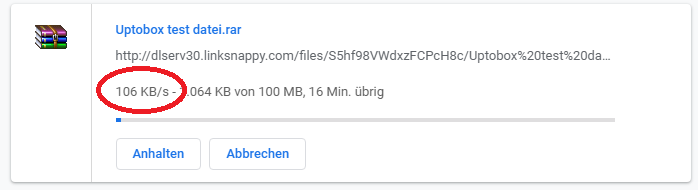
Linksnappy Test 2
We tested the multihoster Linksnappy again and got a much better result. On 03/10/2020, we achieved a download speed of approx. 1,500 Kilobytes per second. The value is quite alright and should be sufficient for quickly downloading movies, small games, or audiobooks.

Upload Test (alt)
The upload of the 100 MB test file was successful. no problem. We have the Google Chrome browser and the upload manager for this Website used by UptoBox. We were able to [the file] with maximum speed upload and the upload took about 5 minutes. Unfortunately, our relatively slow internet connection does not allow for anything more, this was the bottleneck in this case and the reason for the 1MB per second.
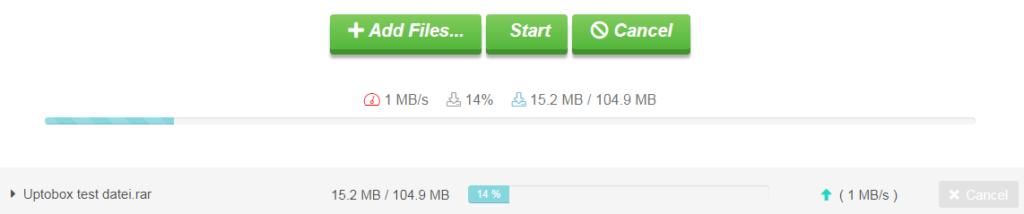
UPtoBox Upload Test (new)
I finally have a faster internet connection now and can download at 200 Mbps and upload up to 25 Mbit/s. Unfortunately, there were no significant advantages with UptoBox, and I could only upload at 1 MB per second, as was already the case in the old upload test.

UPtoBox Free Upload Test
With the free Uptobox account, I was able to upload my file at high speed. The internet connection is significantly faster, yet it remains the bottleneck.

Premium Account Benefits
The Uptobox Premium Account offers the typical benefits of a file hoster. You get maximum download speed and unlimited storage space. Of course, the annoying ads and waiting times are eliminated. Anyone who intends to use the service regularly will have to buy a premium account.
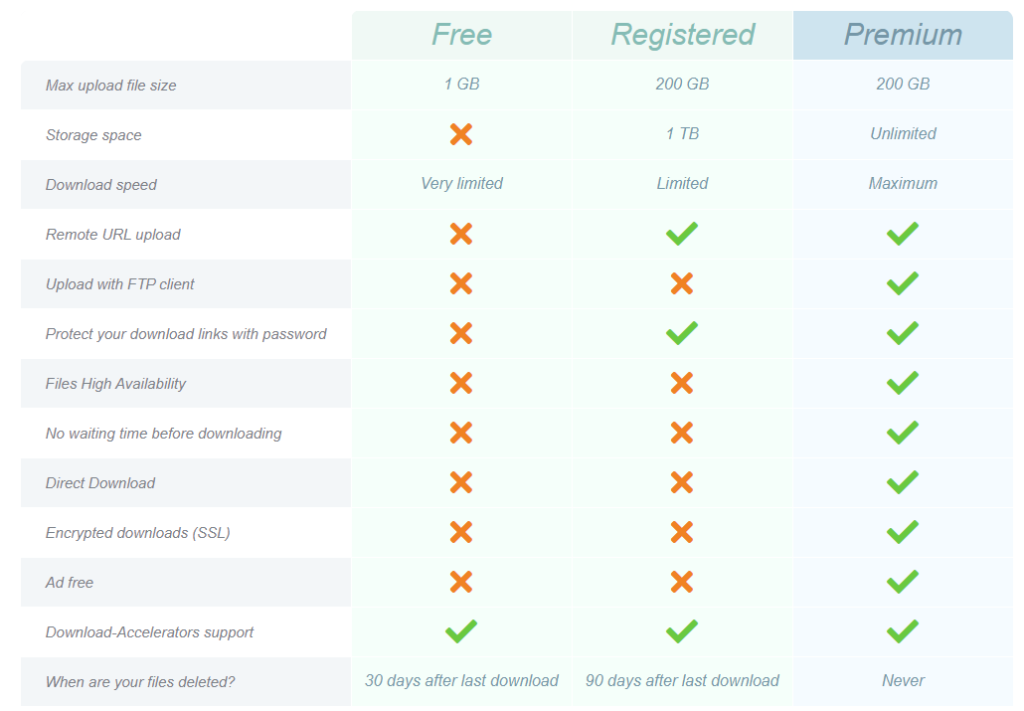
The Costs & Prices
Uptobox is one of the cheaper file hosters on the market. The premium account for 30 days costs only €5. If you download files more often, you should perhaps consider buying the account for a longer duration to save a few euros.

The payment methods PayPal, Bitcoin
Uptobox offers its users various payment methods. Payment by Paysafecard or Webmoney is unfortunately not possible.
Payment Options:
- Payment via PayPal
- Payment by credit card
- Payment via Depipass
- Payment via Bitcoin
- Payment with altcoin
Support
Support is only available in English at UptoBox. Some issues are resolved directly on an FAQ page. If you can't find a solution, you have the option to write a ticket to support. There is also a Facebook page that appears to be relatively up-to-date. The last post is only 10 days old. Additionally, there is a Twitter account for Uptobox.com.
- FAQ Page
- Support Ticket
- Facebook page
- Twitter account
Related Products








User Reviews
No reviews yet