Connect JDownloader 2 to Download Step by Step
In the world of file hosting and downloads, there are numerous platforms, but Download is one that has become increasingly popular in recent years. It offers a wide range of files and a high download speed. But how can DDownload be best utilized? This is where JDownloader 2 into play – a powerful, free download manager that not only makes the process easier but also more efficient. This article explains how to best use DDownload with JDownloader 2.
Step-by-step guide: Using JDownloader 2 for downloads
1. Download and install JDownloader 2
Before you can start downloading DDownload files, you must JDownloader 2 install on your own computer. The software is available for Windows, macOS, and Linux. Here are the steps:
- Visit the official JDownloader Website and download the installation file.
- Install JDownloader 2 by following the instructions in the installer.
- After installation, open the program.
2. Setting up the DDownload Account in JDownloader
To make optimal use of DDownload, especially when one Premium Account hat, one should integrate this into JDownloader 2. This simplifies its use and maximizes download speed.
- Open JDownloader 2 and go to the menu item Settings.
- Select the tab Account Manager.
- Click on Add and search for Download in the list of supported hosts.
- Enter your DDownload account information (username and password).
Once the account has been added, JDownloader 2 will automatically use the premium access to download from Download to process faster and without interruptions.

3. Add download links to JDownloader
Now that JDownloader 2 is set up, DDownload links can be added. There are two ways to do this:
- Automatic detection: JDownloader 2 can automatically detect links from the clipboard. Simply copy the DDownload link, and JDownloader will automatically add it to the Link Collection additionally.
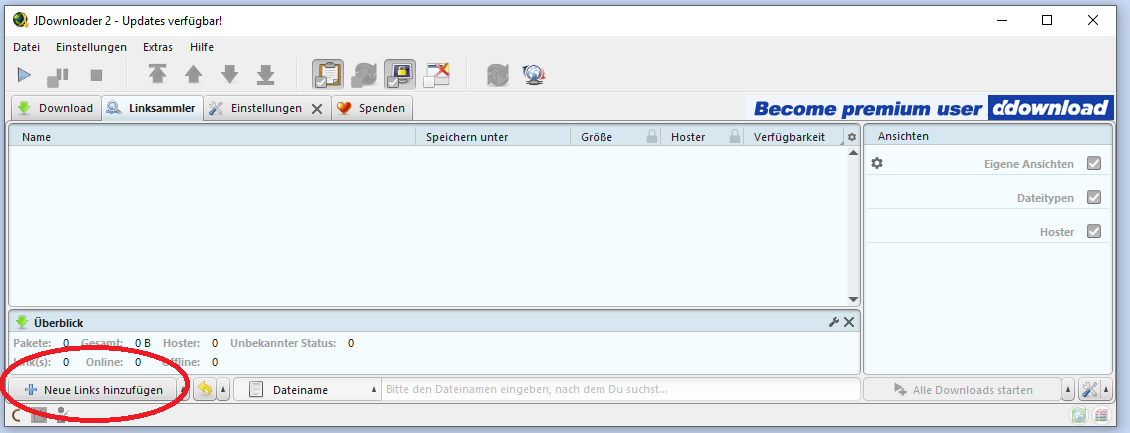
- Manual input Alternatively, you can also add links manually. To do this, go to the tab in the program Link collector and click on Add link. Insert the DDownload link and confirm.
4. Start Download
After the links are added, they appear in the link collector. To start the download, simply mark the desired files and click Start. JDownloader will now automatically handle the download process.
5. Extracting the files (optional)
Should you files as .zip or .rar When downloading, JDownloader 2 offers the practical feature of automatic unpacking. This saves you the extra step of manually unpacking the files.
- Ensure that under Settings > Plugins > Extract Archive the option is enabled.
- After downloading, JDownloader automatically extracts the archives to the directory you selected.
Benefits of using JDownloader 2 with DDownload
The combination of JDownloader 2 and DDownload brings a number of advantages:
- Time saving By automating the management of downloads, including unzipping archives and handling CAPTCHAs, valuable time is saved.
- High speed: JDownloader 2 maximizes download speed, especially for premium users, by utilizing parallel downloads and multiple connections to DDownload's servers.
- Convenient Management: With JDownloader 2, it's easy to download multiple files simultaneously and organize them in a clear manner.
What is DDownload?
Download is a popular file hoster that allows users to upload and download large files. It offers both free and premium accounts. With a premium account, users enjoy benefits such as higher download speeds, parallel downloads, and no waiting times between downloads.
Why JDownloader 2?
JDownloader 2 is an open-source download manager designed to automate and speed up the download process from file hosters. Some of the main features of JDownloader include:
- Support for a variety of hosts, including Download.
- Automatic extraction of downloaded archives.
- Captcha Management.
- Support for premium accounts for faster downloads.
These features make JDownloader 2 the perfect addition for use with DDownload.
Conclusion
Anyone who regularly wants to download large files from DDownload will need the use of a powerful tool such as JDownloader 2 around. The combination of DDownload's fast servers and JDownloader's extensive features makes the entire process effortless. Whether you're an occasional downloader or a power user, JDownloader 2 ensures that your downloads are smooth and efficient.
DDownload and JDownloader 2: Causes of Slow Downloads
If downloading from DDownload with JDownloader 2 is slower than expected, there can be several possible causes. Here are some common reasons and suggested solutions:
1. Download User Status (Free vs. Premium)
- Free account: As a free user, download speeds are often severely limited. DDownload limits speeds for free users to encourage the use of premium accounts. In this case, it's normal for downloads to be slower.
- Premium Account: If you have a premium account and are still experiencing slow downloads, the problem could be due to other factors.
Solution: If you're only using a free account, you could consider upgrading to a premium account to unlock maximum speed.
2. Server Load on DDownload
- High server load: Sometimes DDownload's servers can be overloaded, especially during peak times when many users are downloading files simultaneously. This can greatly affect the speed, regardless of your account status.
Solution: In this case, often all that helps is to wait and try again later, or if available, switch to another server or mirror.
3. Internet connection
- Slow internet connection: If your own internet connection is slow, it could be the cause of the low download speed. This could be caused by problems with your internet provider or by using a slow Wi-Fi connection.
- Bandwidth Limiting Some internet providers throttle bandwidth for certain types of downloads, especially large files or when accessing file hosts.
Solution: Check your internet speed using an online speed test. If possible, use a wired connection instead of Wi-Fi to ensure a more stable connection. If you suspect your provider is throttling your speed, using a VPN might help.
4. Settings in JDownloader 2
- Connection Limits JDownloader 2 allows you to set the number of simultaneous connections and downloads. If these are set too low, it can reduce the speed.
- Maximum number of connections Some file hosts limit the number of connections per file. If JDownloader uses too many parallel connections, this can lead to a decrease in speed.
Solution: Check in the Settings Check under „Connections“ in JDownloader whether the number of simultaneous connections and downloads is set sensibly. It often helps to set the maximum number of connections per file to about 2 to 4, as too many connections can actually slow down the download.
5. Firewall or antivirus software
- Blocking or throttling by security software: Some firewalls or antivirus programs can monitor and potentially slow down the download process to block malware. This can particularly happen with large downloads or when using download managers like JDownloader.
Solution: Temporarily disable your firewall or antivirus software to see if your download speed improves. However, be sure to download files from trusted sources when disabling security software.
6. VPN or Proxy
- Slow VPN connection: Accessing DDownload via a VPN or proxy can slow down your speed, especially if the VPN server is overloaded or geographically distant.
Solution: Test the download without a VPN or switch VPN servers to see if the speed improves.
7. File size and download sources
- Fragmented files or mirrors Some files are split into smaller parts or available on different servers (mirrors). If one of these servers is slow, it can slow down the entire download process.
Solution: If possible, try to download the file from another mirror or server. Also, ensure that you choose a stable source that is not affected by external factors.
Summary
The slow download speed can be caused by various factors. Here are the most important ones to check:
- Your DDownload account status (Free or Premium).
- Current load on DDownload servers.
- The stability and speed of your internet connection.
- The correct settings in JDownloader 2 (connection limits, number of parallel downloads).
- Possible blocking by firewall or antivirus.
- Using a VPN or proxy (possible throttling).
- Quality of the source or server you are downloading from.
By checking and adjusting these factors, download speeds can be improved in most cases.




No Comments found