
Description
EarnVids is a video hosting service where users can upload, stream, share, and earn money through views or downloads. The service thus belongs in the same category as DoodStream, VOE.sx, FileMoon, LuluStream, Vidoza, MixDrop, Streamtape or StreamHG.
The name already reveals quite clearly what it's about: EarnVids doesn't just focus on pure video hosting, but also on monetization. Users are supposed to upload videos, share links, and receive compensation per 10,000 views or downloads depending on the viewers' country of origin. According to the current affiliate page, EarnVids pays up to $33 USD per 10,000 views/downloads.
Important information beforehand: EarnVids should only be used for content for which you own the necessary rights or which is legally permissible to distribute. In its Terms of Service, EarnVids describes itself as an online file storage and sharing service, explicitly referencing DMCA compliance and the removal of copyrighted material upon complaint.
What is EarnVids?
EarnVids is a video hosting service with an upload, streaming, sharing, API, and affiliate program. Users can store videos online and play them in their browser or on mobile devices. In its FAQ, EarnVids describes itself as a „Fast HLS Video Streaming Service“ with online storage, upload features, and video playback tools.
At its core, EarnVids functions like other classic video hosting services: you upload a video, get a link or embed code, and can then share the video or embed it on websites. For webmasters and larger uploaders, the API is also interesting because it supports uploads, remote uploads, subtitles, file management, folders, and statistics.
EarnVids in Review: First Impression
EarnVids seems like a typical video host from the uploader and monetization scene. The service is less designed for high-quality business videos or online courses, and more for practical functions: uploading videos, sharing, generating views, and earning money.
The positive is that EarnVids clearly states a lot of important information relatively clearly: country tiers, compensation per 10,000 views/downloads, minimum video length, view conditions, minimum payout, and payout day. This transparency is particularly important with video hosts because many services promise high rates but hide the concrete rules in the fine print.
At the same time, EarnVids should not be categorized as a reputable premium video platform for brand projects. The service is more suited for uploaders, video webmasters, and users who want to test various pay-per-view hosts.
Video Upload on EarnVids
Video uploads to EarnVids are possible in several ways. The API documentation describes, among other things, upload servers, direct file uploads, uploads via URL, and subtitle uploads. According to the API, title, description, custom thumbnail, folder ID, category, tags, public status, and adult marking can also be passed during file uploads.
For regular users, this means: A single video can be uploaded classically via the website. However, for larger uploaders, the API is particularly exciting because it allows uploads to be automated. Also the Upload by URL is practical when a video file is already online and doesn't need to be downloaded locally and then uploaded again.
Supported Files and Streaming
In the FAQ, EarnVids writes that all video file formats can be uploaded. According to the FAQ, restrictions apply to copyrighted material and offensive content, among other things.
According to the FAQ, the service optimizes the quality and file size of videos, making them playable in web players so viewers don't have to download the entire file before they can start watching.
This is an important difference from a pure file hoster: EarnVids is clearly designed for streaming. This means videos are intended to be playable directly in the browser or on mobile devices.
Streaming and Playback as a Spectator
From the viewer's perspective, EarnVids functions like many other video hosts. You open a link or see an embedded player on a webpage. The video then plays in the browser.
Technically, according to the FAQ, EarnVids relies on HLS streaming. This is generally sensible because HLS is widely used for web and mobile streaming. Nevertheless, the actual user experience heavily depends on advertising, browser, device, server load, video file, and ad blockers.
Advertising is important on EarnVids because, according to affiliate rules, rewards are not counted if ads are blocked. For website operators, this is a classic conflict of interest: uploaders want revenue, while visitors want as little advertising as possible.
Download as user
EarnVids compensates not only for views but also for downloads, according to the affiliate page. It explicitly states that a fixed amount per 10,000 Downloads or views payment is made.
For users, this means that depending on the file and settings, EarnVids can be used not only as a streaming host but also as a download host. However, how comfortably the download proceeds depends on the specific website, advertising, potential waiting times, and the respective file link.
Important for visitors: Always pay close attention to what you click on video hosting sites. A video file should indeed be a video file, like MP4, MKV, or AVI. Better to steer clear of EXE files, installers, or strange add-on programs. This sentence might sound dry, but it can often save you an afternoon full of malware headaches.
API and technical capabilities
EarnVids offers a rather extensive API. According to the documentation, there are functions for account information, account statistics, upload servers, file uploads, URL uploads, subtitle uploads, file information, file editing, file lists, file cloning, direct links, deletion, deleted files, DMCA files, encodings, and folder management.
This isn't necessarily crucial for regular users. However, it's a plus point for webmasters, larger uploaders, and developers. Uploads can be automated, files managed, folders created, and statistics queried.
It is also interesting that the API can output HLS direct links or HLS manifests if the corresponding HLS functionality is available. This shows that EarnVids doesn't technically rely solely on simple download links, but also supports streaming workflows.
Earn Money with EarnVids
The affiliate program is the most important point at EarnVids. According to the current EarnVids page, the following compensation is offered per 10,000 views or downloads:
| Tier | Countries | Remuneration per 10,000 views/downloads |
|---|---|---|
| Tier 1 | Australia, Canada, United Kingdom, USA | 33 US dollars |
| Tier 2 | Denmark, Finland, France, Germany, Norway, Sweden | 22 US dollars |
| Tier 3 | Austria, Italy, Japan, Netherlands, South Africa, Spain, Switzerland | 11 US Dollars |
| Tier 4 | Belgium, Poland, Portugal, Romania, Russia, Singapore, Slovakia | 7 US dollars |
| Other countries | all other countries | 5 US dollars |
Germany is therefore at $22 per 10,000 views/downloads. This looks good on paper, but of course, it's no guarantee of high earnings. What's crucial are actual visitors, viewership, valid views, advertising, ad blockers, traffic quality, and payout practices.
Terms of Remuneration
EarnVids names several rules so that views or downloads are rewarded. Per user IP, a maximum of 2 views or downloads within 24 hours counted. Additionally, videos must be at least 3 minutes long . For videos shorter than 5 minutes, at least 90 % must be viewed; for videos longer than 5 minutes, at least 10 % of viewing time is required.
According to EarnVids, unfunded views include those with blocked ads, traffic from third-party apps, automated downloads, and fraudulent behavior. Fraud can result in immediate account suspension.
You shouldn't underestimate that. Especially with hosts like these, „a lot of traffic“ doesn't automatically mean „a lot of money.“ Only valid traffic counts.
Payouts at EarnVids
According to EarnVids, the minimum payout is 20 US dollars. According to the provider, payment requests are processed every Wednesday. Those who want a payout should submit their request before Tuesday 00:00 UTC to avoid any interruption in the process.
For uploaders, this is generally manageable. Nevertheless, I would start cautiously with EarnVids like with all video hosts: first test smaller uploads, observe the initial statistics, request a payout, and then decide whether to use the service more extensively.
Premium at EarnVids
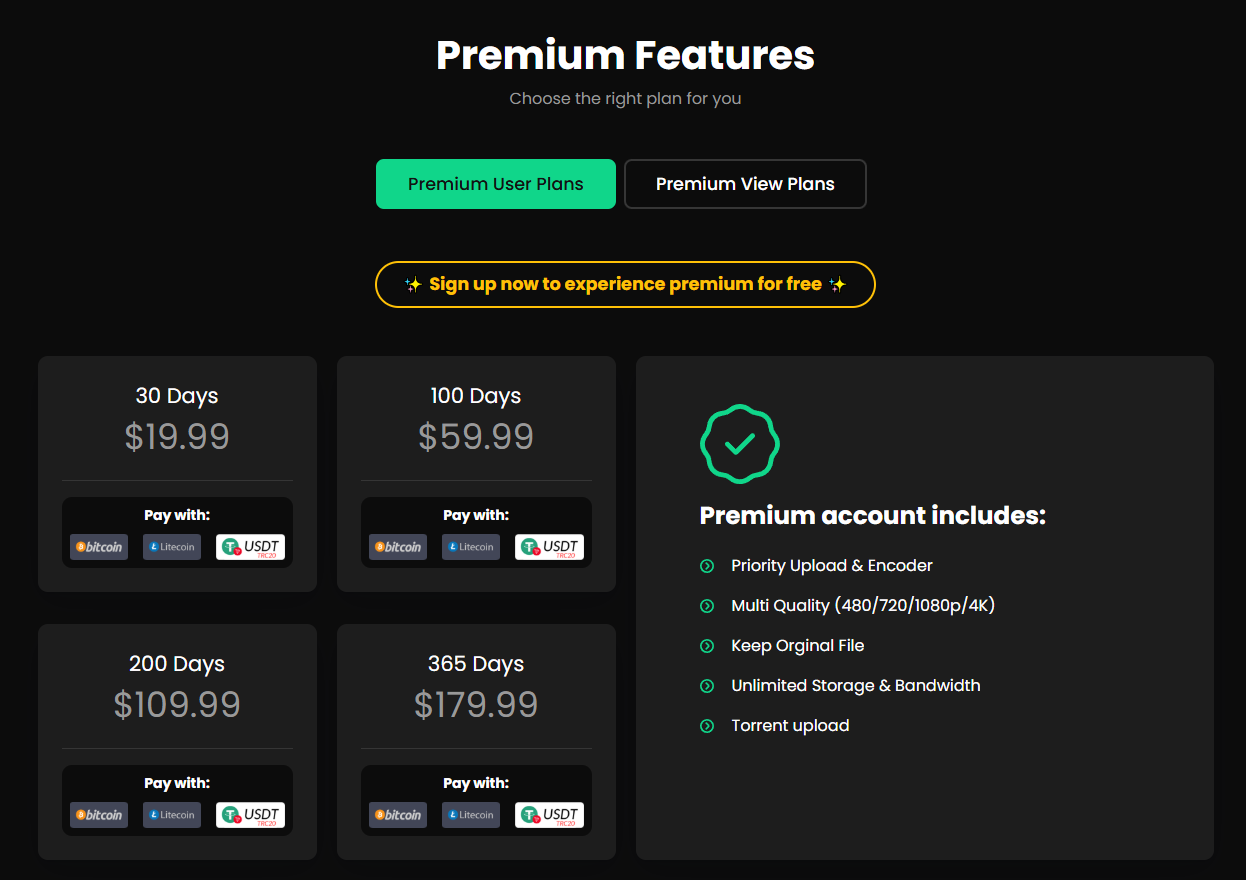
EarnVids offers premium plans for uploaders and separate view plans. According to the current premium page, the premium user plans cost:
| Runtime | Price |
|---|---|
| 30 days | $19.99 |
| 100 days | $59.99 |
| 200 days | $109.99 |
| 365 days | $179.99 |
According to EarnVids, Premium includes, among other things Priority Upload & Encoder, Multi-Quality with 480p, 720p, 1080p, and 4K, Keep original file, unlimited storage and bandwidth, and torrent upload.
Additionally, there are Premium View plans, for example, 20,000 views for $10, 40,000 views for $20, 100,000 views for $50, and 200,000 views for $100. According to the Premium page, these view plans include „No Ads All Videos,“ Priority Support, and Direct Links, among other benefits.
Non-refundable premium payments
An important point: EarnVids explicitly points out on the premium page a Non-Refund Policy Payments shall not be refunded, among other things, if the purchased services are not fully utilized, if the customer changes their mind after payment, or if the plan details were not carefully reviewed.
For users, this means: Before purchasing, be sure to carefully check if the plan really fits. Especially with video hosts that offer crypto payments and have no-refund policies, a small test is smarter than buying a yearly plan directly.
Advertising and user experience
EarnVids is clearly driven by advertising and monetization. This is evident from the fact that rewards are not counted when ads are blocked. This is logical for uploaders, as without advertising there are fewer or no earnings. However, for visitors, it can become uncomfortable.
Therefore, one should always check for oneself before offering a genuine recommendation:
- Does the video start cleanly?
- Are there popups?
- Are there any redirects?
- Does the player work on mobile?
- What happens with Adblocker?
- Is the download button clearly visible?
EarnVids can work for uploaders, but for high-quality websites, the ad experience is the crucial sticking point.
Legal classification
EarnVids clarifies in its Terms that the service functions as an online file storage and sharing service. It also lists various prohibited content. This includes, but is not limited to, content related to child sexual abuse, animal abuse, violent imagery, incitement, terrorism, and arms trafficking.
EarnVids also refers to DMCA compliance on the topic of copyright. In case of complaints about files, the user may be asked to remove copyrighted files until the matter is resolved.
For uploaders, this clearly means: Do not upload third-party films, series, sports broadcasts, music videos, OnlyFans reuploads, course videos, or other protected content if you do not have the rights. This can lead to deletions, blockages, and legal problems.
Advantages of EarnVids
EarnVids has some clear advantages:
- Focus on video hosting and monetization
- HLS Streaming According to FAQ
- Upload by file and URL
- API for uploads, subtitles, files, folders, and statistics
- Pay-per-View and Pay-per-Download
- Germany, with 22 $ per 10,000 views/downloads, is in Tier 2
- Minimum payout starting at 20 $
- Payment processing every Wednesday
- Premium with Multi-Quality up to 4K
- Premium with Priority Upload & Encoder
- View plans with ad-free videos and direct links
Therefore, EarnVids is quite interesting for uploaders with their own traffic.
Disadvantages of EarnVids
The weaknesses are also obvious:
- highly dependent on advertising
- Rewards don't count with Adblock
- Videos must be at least 3 minutes long
- For short videos, you must watch 90 %
- No-Refund Policy for Premium
- Premium prices aren't exactly low
- more of an uploader-host than a business platform
- The user bears legal responsibility
- Long-term viability and payout practices should be tested first.
For professional websites, online courses, or brand projects, I would be cautious with EarnVids. Providers like Cloudflare Stream, Bunny Stream, Wistia, or Vimeo would be significantly better.
Who is EarnVids suitable for?
EarnVids is especially suitable for:
- Uploader with own traffic
- Webmaster with video pages
- Users who want to test Pay-per-View
- Users who also want to monetize downloads
- Larger uploaders with API needs
- Website operators who want to host videos externally
- Users with traffic from Tier 1 or Tier 2 countries
EarnVids is less suitable for:
- professional corporate videos
- high-quality online courses
- sensible content
- Brand websites
- Long-term video archives without backup
- Projects where advertising should be completely avoided
- Users who expect a particularly clean premium experience
EarnVids Alternatives
Anyone testing EarnVids should also compare other video hosts. Similar providers include:
- DoodStream
- VOE.sx
- FileMoon
- LuluStream
- Vidoza
- MixDrop
- Streamtape
- StreamHG
- Netu
For more professional video projects, these providers are more suitable:
- Cloudflare Stream
- Bunny Stream
- Wistia
- Vimeo
- AboveStream
Conclusion: Is EarnVids worth it?
EarnVids is an interesting video host for uploaders and webmasters who want to upload, stream, embed, and monetize videos through views or downloads. Particularly exciting are the clear country tiers, the compensation per 10,000 views/downloads, the API, HLS streaming, and the premium options with multi-quality up to 4K.
Nevertheless, one should put EarnVids into perspective. The service is not an elegant business video host, but rather a platform for uploaders and monetization. Advertising, adblock rules, premium costs, no-refund policy, and legal responsibility remain important points.
In short: EarnVids can be an exciting alternative to DoodStream, Vidoza, LuluStream, or Streamtape — especially for uploaders with their own traffic. However, for professional websites, online courses, or reputable brand projects, I would rather rely on Cloudflare Stream, Bunny Stream, Vimeo, or Wistia.
Frequently Asked Questions about EarnVids
What is EarnVids?
EarnVids ist ein Video-Hoster mit Upload, Streaming, Sharing, API und Verdienstmodell für Views bzw. Downloads.
Kann man bei EarnVids Videos hochladen?
Ja. EarnVids bietet Datei-Upload und Upload per URL. Über die API sind außerdem Untertitel-Upload, Datei-Management, Ordnerverwaltung und Statistiken möglich.
Welche Dateiformate unterstützt EarnVids?
Laut FAQ können alle Video-Dateiformate hochgeladen werden, solange die Inhalte nicht gegen Regeln oder Rechte Dritter verstoßen.
Kann man mit EarnVids Geld verdienen?
Ja. EarnVids zahlt laut Affiliate-Seite pro 10.000 Views oder Downloads, abhängig vom Herkunftsland der Zuschauer. Die höchsten Raten liegen bei 33 US-Dollar.
Wie hoch ist die Mindestauszahlung?
Die Mindestauszahlung liegt laut EarnVids bei 20 US-Dollar.
Wann zahlt EarnVids aus?
Zahlungsanfragen werden laut EarnVids jeden Mittwoch bearbeitet.
Was kostet EarnVids Premium?
Laut Premium-Seite kostet EarnVids Premium 19,99 US-Dollar für 30 Tage, 59,99 US-Dollar für 100 Tage, 109,99 US-Dollar für 200 Tage und 179,99 US-Dollar für 365 Tage.
Ist EarnVids empfehlenswert?
Für Uploader mit eigenem Traffic kann EarnVids interessant sein. Für professionelle Webseiten, Onlinekurse oder hochwertige Markenprojekte ist der Dienst wegen Werbung, Monetarisierungsfokus und typischer Video-Hoster-Risiken eher nur eingeschränkt geeignet.
Related Products








User Reviews
No reviews yet